Quick answer
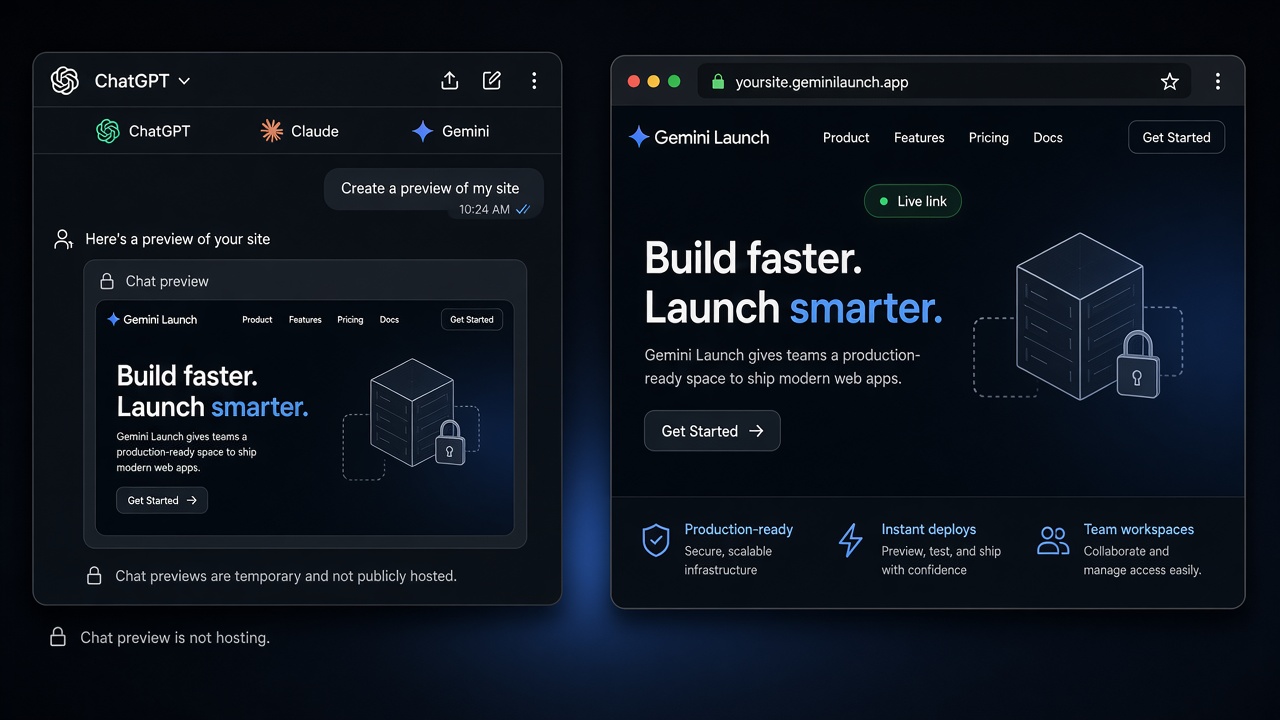
Chat preview is not hosting. To share an AI website, copy the full HTML (or ZIP), publish it on a host like GeminiLaunch, and send the public HTTPS link. Built-in ChatGPT / Claude / Gemini share buttons are fine for quick demos — use a real host when anyone must open the page without an AI account, or when you want yourbrand.com later from Lite ($5/mo).
Your AI site, a real link.
Paste from chat, go live free, share with anyone.
The confusion
Three different things people call a “link”
Founders ask AI for a website, see a beautiful preview, then hit a wall: the “share” option needs a login, the URL looks temporary, or the page never opens outside the chat. That is not a bug in your design — it is three layers mixed up.
- Chat preview — lives inside the AI product while you iterate.
- Built-in share / Publish — a link on the AI company’s domain (when available on your plan).
- Real host — your files on HTTPS you control, then optionally yourbrand.com.
Key insight
If visitors need ChatGPT or Claude to see the page, you still have a chat share — not a website you can put on a business card.
Compare
Chat share vs real live link
Official product docs own the exact Sites / Artifact buttons. This table is only the share decision for beginners.
| Layer | URL type | Who can open it | Best for |
|---|---|---|---|
| Chat preview | Inside the AI app | Usually only you (or people in that chat) | Checking layout while you iterate |
| Built-in share / Publish | chatgpt.site, claude.site, g.co, pplx.app… | Depends on plan — sometimes sign-in required | Quick demos with people who already use that AI |
| Real host (GeminiLaunch) | Public HTTPS you control | Anyone with the link — no AI account | Clients, customers, investors, yourbrand.com later |
Decision
Which path should you pick?
Built-in share is enough when
- You only need a teammate who already uses that AI to glance at a prototype
- You are fine with the platform’s subdomain and branding for a one-off demo
- You are on ChatGPT Sites (eligible paid plans) and that host fits your product
Use a real host when
- Clients or customers must open the link without an AI account
- You want a stable URL that is not tied to a chat thread or platform wrapper
- You plan to put the site on yourbrand.com later
- You already have the HTML/React/ZIP and do not want to rebuild in Wix or Framer
Already debating Framer or Wix instead of hosting the code you have? Read Already have AI code? Skip the builder.
How to
Get a live link from chat in four steps
Same path whether the site came from ChatGPT, Claude, Gemini, Copilot, or Perplexity — as long as you can copy the files.
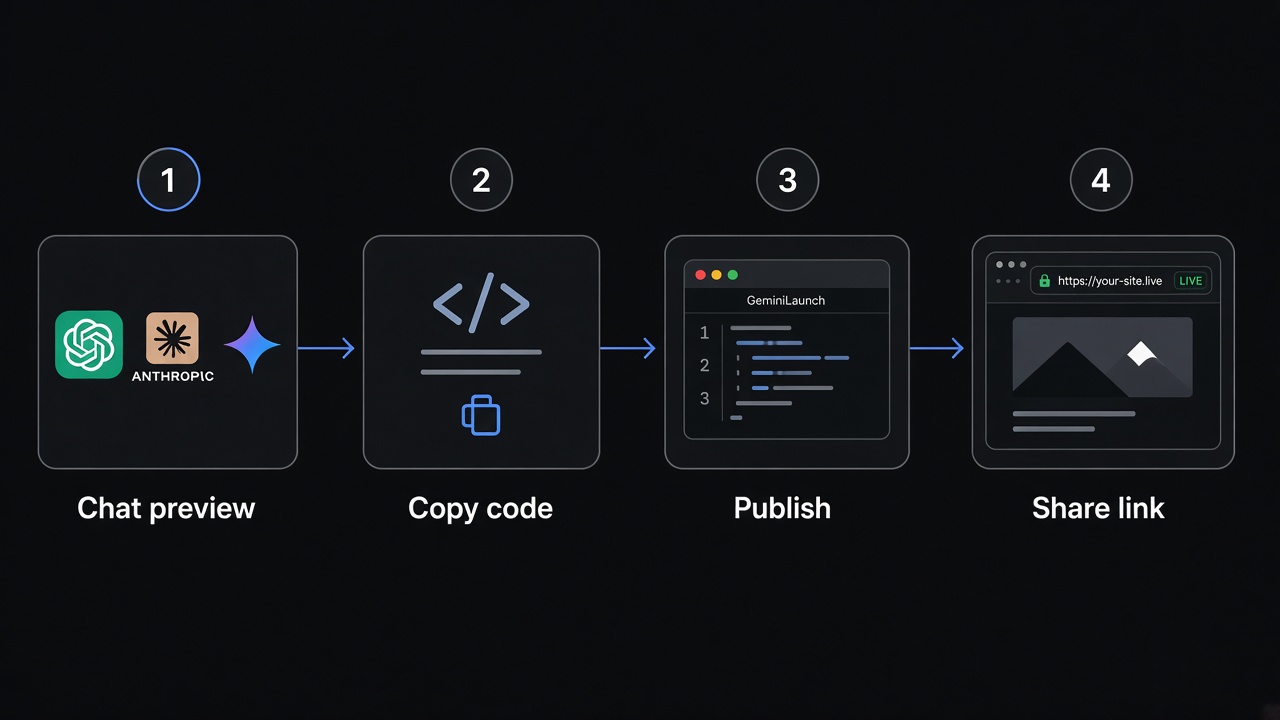
Ask the AI for one complete file
In ChatGPT, Claude, Gemini, Copilot, or similar, ask for a single HTML file with CSS and JavaScript inline. Split answers and “add this to your CSS” snippets are the #1 reason shared links look broken.
Prompt: "Give me the complete page as one index.html with CSS in a style tag and JS in a script tag. No placeholders."
Copy the full code block
Use the code block’s Copy button. Check that the file ends with a closing </html>. If the reply was cut off, ask it to continue, then stitch the pieces together before you publish.
Optional: paste into the free HTML preview tool first to catch layout bugs before you go live.
Publish and get a public live link
Paste into GeminiLaunch (or upload a ZIP/folder with index.html) and click Go Live. You get a free HTTPS URL anyone can open in any browser — no ChatGPT, Claude, or Gemini account required on their side.
Free: up to 3 live sites, 5 MB each. That is enough for most landing pages and portfolios.
Upgrade to yourbrand.com when you are ready
Share the free link first. When you want a business card URL, upgrade to Lite ($5/mo) for 1 custom domain (or Pro for up to 5), add the DNS record GeminiLaunch shows, and keep the same site — no rebuild.
Chat share links and AI subdomains are for demos. Your own domain is the premium step founders usually need before launch announcements.
Avoid these
Common mistakes
Sending a chat screenshot or Drive ZIP instead of a URL
Founders and freelancers often email a ZIP or a photo of the preview. Recipients cannot click that. A public HTTPS link is the shareable object.
Treating the AI preview as “published”
If it only opens inside ChatGPT, Claude, or Gemini, it is still a preview. Publishing means a host serves the files on the open web.
Copying only part of a multi-file reply
Missing CSS or JS makes the live page look empty. Ask for one self-contained file, or ZIP a folder with index.html at the root.
Buying a domain before the free link looks right
Publish and QA the free URL first. Connect yourbrand.com from Lite only after the page looks correct — DNS mistakes are harder to unwind mid-draft.
Want a browser check before you publish? Preview AI HTML online — free, no signup.
Related guide
Claude artifact → website
Deep dive when the chat preview is a Claude artifact / claude.site link.
Read the guideRelated guide
Does ChatGPT host websites?
Sites vs a host you control — when “does ChatGPT host?” is the whole question.
Read the guideRelated guide
Grok past grok.me
Grok Build lives on grok.me. Chat HTML has no URL. Free live link path.
Read the guideFAQ
Share AI website FAQ
Direct answers for “AI website only works in chat,” live links, and beginner hosting — tuned for Google, ChatGPT, Claude, and Perplexity.
Why does my AI website only work in the chat?
The AI showed you a preview inside its product. That preview is not a public website until the files are published on a host. Copy the HTML (or ZIP), publish to a live URL, then share that link.
How do I share a ChatGPT or Claude website with someone?
Built-in Share/Publish can work for demos, but many links still need an AI account or stay on chatgpt.site / claude.site. For a link anyone can open, paste the code into GeminiLaunch and send the free HTTPS URL.
Is a chat share link the same as AI website hosting?
No. A share link lives inside the AI product. AI website hosting means a host serves your files on HTTPS — free subdomain first, custom domain when you upgrade. See our AI web hosting guide for the fuller map.
Do people need ChatGPT or Claude to open my site?
Not if you publish on a normal host. With GeminiLaunch, anyone opens the link in any browser with no AI signup. Platform share links often require a ChatGPT or Claude account — check the product’s share settings.
What is the fastest free way to get a live link for an AI website?
Ask for one HTML file, paste it into GeminiLaunch, and click Go Live. You get a public URL in under two minutes — no GitHub, no credit card. Preview in our free HTML viewer first if you want a safety check.
When should I connect my own domain?
After the free link looks right. Lite ($5/mo) adds 1 custom domain and removes the free badge; Pro ($15/mo) adds up to 5 domains plus analytics. Domain setup is one DNS record — not a reason to rebuild the site.
What if I already use ChatGPT Sites or Claude Publish?
Keep them when that host fits. Use this guide when you need a link outside the AI product, or when Free/Go / region / branding limits block you. Free/Go Sites blocked: ChatGPT Sites not available? Publish free anyway. Other deep dives: ChatGPT Sites custom domain and Claude artifact → website.
Can I skip copy-paste and publish from the chat?
Yes with MCP: connect GeminiLaunch once in Claude, ChatGPT, Cursor, or Gemini CLI, then ask the AI to publish. Full setup: publish a website from Claude or ChatGPT with MCP.
Like this guide? Make GeminiLaunch a preferred source.
Get our hosting and deployment guides surfaced first in your Google results, AI Overviews, and Top Stories.
Stuck in the chat? Get a link anyone can open
Paste your ChatGPT, Claude, or Gemini page into GeminiLaunch, publish free HTTPS, share it today — then connect yourbrand.com from Lite when you are ready. No credit card to start.