
Quick answer
Gemini website hosting made simple: Google Gemini generates websites but does not host them. Copy the code from Canvas, paste it into GeminiLaunch, and click Go Live. You get a free live URL in under 30 seconds — no GitHub, no terminal, no file saving. Prefer Gemini CLI to publish for you? Connect the GeminiLaunch MCP server.
The gap
Why hosting Gemini websites is confusing
Gemini 2.5 Pro with Canvas is one of the fastest ways to build a website. Describe what you want, and Gemini writes HTML, CSS, and JavaScript with a live preview in seconds.
Then you try to share it. There is no deploy button in Gemini — no hosting option, no live URL. The code stays inside Canvas unless you take it somewhere else.
Here is what Gemini does not give you:
A public URL that anyone on the internet can visit
A way to connect your own custom domain
Built-in hosting or deployment from Canvas
SEO metadata fields (title, description, Open Graph)
Key insight
Gemini is the builder. It is not the host. Paste-and-publish closes the gap — no files, no Git, no deployment pipeline.
Compare
5 Gemini website hosting options, compared
Every platform below can host Gemini-generated code. The difference is how many steps it takes.
| Platform | Method | Time | Git? | Domain | React | Best for |
|---|---|---|---|---|---|---|
| GeminiLaunch | Paste code → click publish | Under 30 seconds | No | From $5/mo (Lite) | Yes | Fastest path from Gemini to live URL |
| Cloudflare Pages | Create folder → save file → sign up → upload → deploy | 10–20 minutes | Optional | Free | Yes (with build) | Developers who want global CDN |
| Netlify Drop | Save HTML → drag folder into browser | 2–3 minutes | No | Free (with account) | No (HTML only on Drop) | Quick one-off HTML deploys |
| GitHub Pages | Create repo → upload files → enable Pages | 10–15 minutes | Yes | Free | No (static only) | Developers with Git experience |
| Vercel | Connect repo → configure build → deploy | 10–20 minutes | Yes | Free | Yes | Full-stack React projects |
Step-by-step
Host your Gemini website in 4 steps
From Gemini prompt to live URL takes about 3 minutes. Most of that is waiting for Gemini to generate the code.
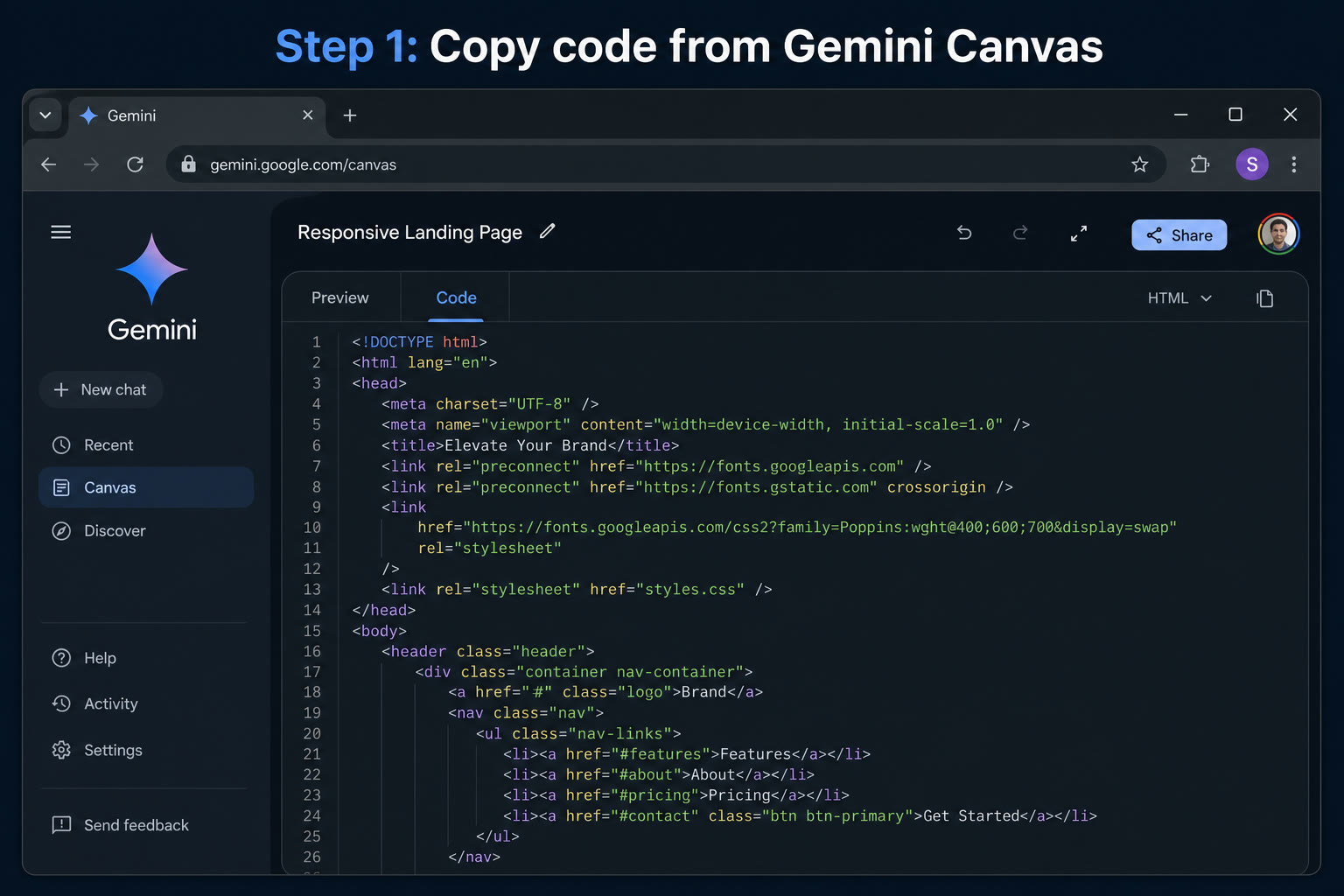
Open Gemini and generate your website
Go to gemini.google.com, select Gemini 2.5 Pro, and turn on Canvas below the text field. Type a prompt like: "Create a landing page for [your idea]. Use HTML, CSS, and JavaScript." Gemini generates and previews the page inside Canvas in seconds.
Tip: Be specific in your prompt. "Create a landing page for a dog walking service in Austin with pricing, testimonials, and a contact form" gives better results than "make me a website."
Copy the code from Gemini Canvas
Once the preview looks right, open the Code tab at the top of Canvas. Copy the full HTML, CSS, and JavaScript block — scroll to the bottom so nothing is missing. You do not need to save files or create folders.
Tip: If Gemini split your site into separate files, ask: "Give me this entire page as a single HTML file with all CSS and JavaScript inline."
Paste into GeminiLaunch and publish
Go to geminilaunch.com and create a new project. Paste the code into the editor. GeminiLaunch auto-detects HTML or React — no config required. Click Go Live. Within seconds you have a public URL at yoursite.geminilaunch.com.
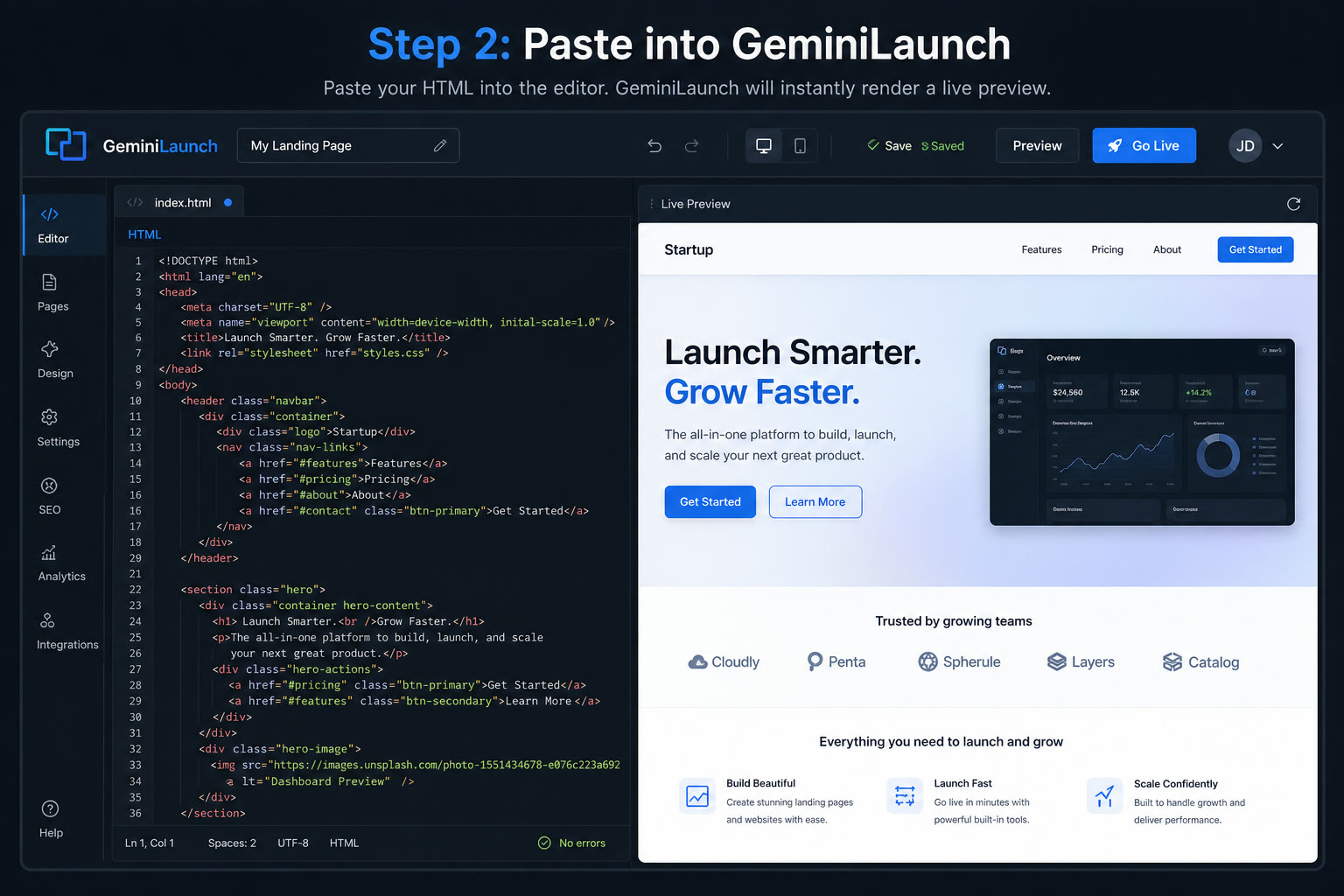
Tip: Set your page title and meta description before publishing so Google and social previews look correct.
Connect your own domain (optional)
Your free subdomain works immediately for sharing and client demos. When you are ready for yourbrand.com, upgrade to GeminiLaunch Lite ($5/mo) for 1 domain, or Pro ($15/mo) for up to 5. Add one DNS record at your registrar, and your site goes live on your own domain.
Tip: Lite includes 1 custom domain; Pro supports up to 5. Most DNS changes propagate within 5 to 30 minutes.

Live example
See a published Gemini site
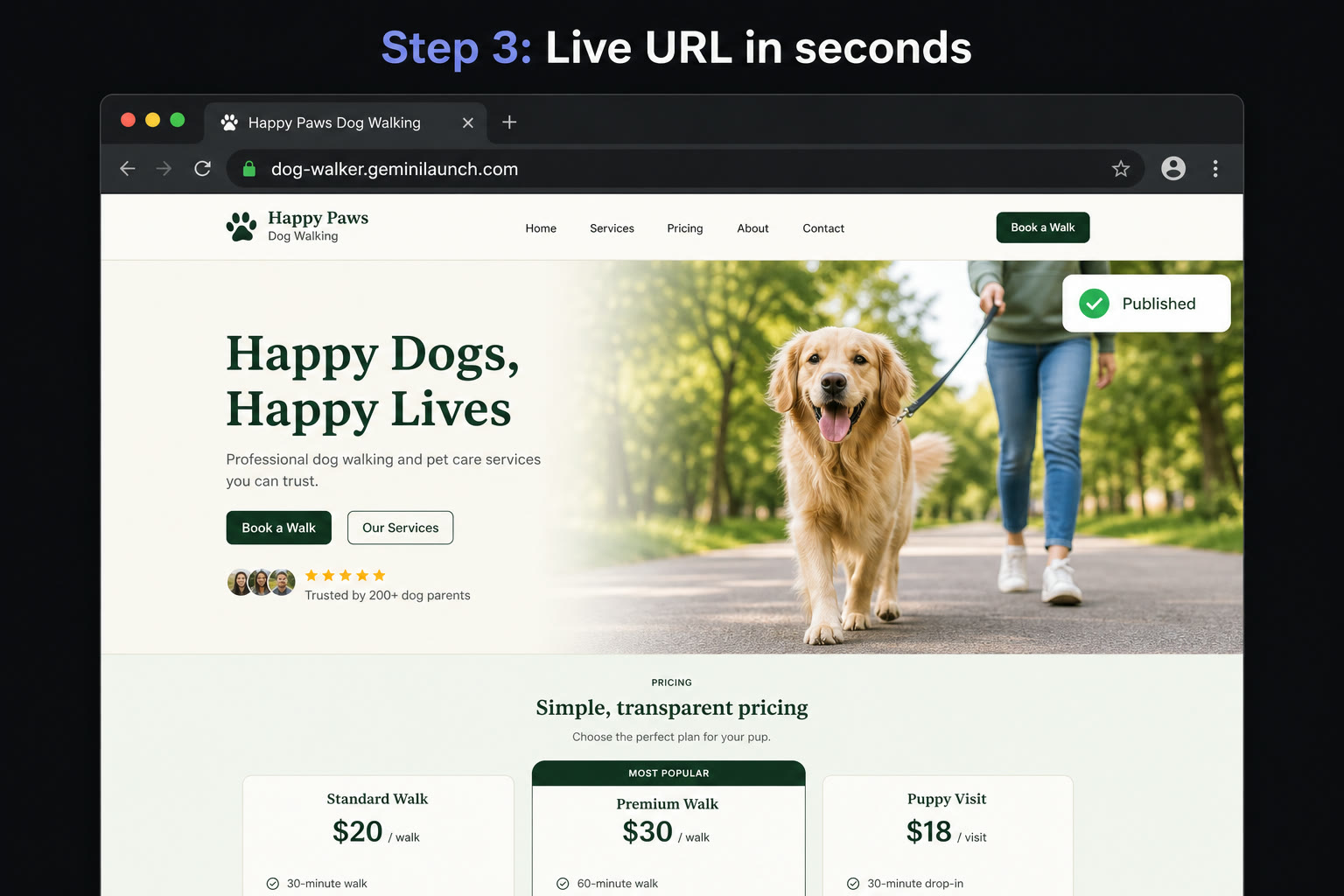
This dog-walking landing page was built in Gemini Canvas and published on GeminiLaunch — same workflow as the steps above. No GitHub, no zip file, no build command.
Published example
dog-walker.geminilaunch.comOpen it in any browser — no Google account required. This is what a Gemini-built page looks like once it leaves Canvas.
Copy-paste prompts
Best prompts for building Gemini websites
Better prompts give better websites. Paste any of these directly into Gemini Canvas.
SaaS landing page
Create a modern landing page for a SaaS product that converts user ideas into professional blog posts using AI. Include a hero section, feature highlights, pricing tiers, testimonials, and a signup CTA. Use HTML, CSS, and JavaScript.
Portfolio website
Create a minimal portfolio website for a freelance photographer. Include a grid gallery, about section, contact form, and social media links. Dark theme, clean typography. Use HTML and CSS.
Restaurant page
Create a one-page website for an Italian restaurant. Include the menu with prices, hours, location with embedded Google Map, reservation button, and photo gallery. Use HTML, CSS, and JavaScript.
Avoid these
Common mistakes with Gemini website hosting
Saving the code as a file before hosting
Most tutorials tell you to create a folder and save index.html before uploading. With GeminiLaunch you paste directly from Canvas — no files, folders, or zip.
Using a Git-based host for a simple Gemini page
GitHub Pages and Vercel are great for developers, but a repository is overkill for a single Gemini-generated landing page. Paste-and-publish is faster when you just need a live URL.
Forgetting to set meta tags before publishing
Gemini generates the visible page but not SEO metadata. Fill in the title and meta description fields in GeminiLaunch before you publish.
Not republishing after editing in Gemini
If you update the design in Gemini, copy the new code into the same GeminiLaunch project and publish again. Your URL stays the same; the content updates instantly.
Honest limits
When GeminiLaunch isn't enough
GeminiLaunch is built for getting AI-generated frontends live fast. It is not the right tool for every project. Consider a full-stack platform when you need:
You need a backend — user accounts, a database, or server-side form handling
You are building a full e-commerce store with payments and inventory
Your team requires Git-based CI/CD with staging and production branches
You need serverless API routes, edge functions, or complex server logic at scale
For those cases, Vercel with a GitHub repo or a backend provider like Supabase is a better fit. For landing pages, portfolios, and marketing sites from Gemini Canvas, paste-and-publish is usually all you need.
Related guide
Turn a Gemini Canvas into a real website
Detailed walkthrough of the Canvas to GeminiLaunch workflow.
Read the guideRelated guide
Turn a Google AI Studio project into a website
Build mode ZIP → dist upload — when you used AI Studio instead of Canvas.
Read the guideGemini hub
All Google Gemini guides
Canvas, AI Studio, MCP, and custom domain — one index page.
Open the hubFAQ
Frequently asked questions about Gemini website hosting
What is the best hosting for Gemini AI websites?
GeminiLaunch is the fastest option — paste your Gemini Canvas code and get a live URL in under 30 seconds. Alternatives like Cloudflare Pages and Netlify Drop work too but require more steps.
How do I publish a website made with Gemini Canvas?
Open Canvas, switch to the Code tab, copy the HTML, paste it into GeminiLaunch, and click Go Live. The whole process takes under a minute.
Does Gemini website hosting require GitHub?
Not with GeminiLaunch. You paste code directly — no GitHub account or git commands. GitHub Pages is an alternative but requires a repo and enabling Pages in settings.
Can I use a custom domain with my Gemini website?
Yes. On GeminiLaunch Lite ($5/mo) connect 1 custom domain; Pro ($15/mo) includes up to 5. Add one DNS record at your registrar and your site goes live on your own domain within minutes.
Is GeminiLaunch the same as Google Gemini?
No. Google Gemini generates the code. GeminiLaunch hosts it. You build in Gemini, then publish on GeminiLaunch.
Does Gemini website hosting work with React code?
Yes. GeminiLaunch auto-detects HTML and React. If Gemini generates JSX, GeminiLaunch renders it without a build step or configuration.
What is the difference between GeminiLaunch and Cloudflare Pages for Gemini sites?
GeminiLaunch is paste-and-publish — live in about 30 seconds. Cloudflare Pages requires saving HTML files, signing up, and navigating their dashboard. Cloudflare offers free custom domains; GeminiLaunch offers them from Lite.
Does Google Gemini have built-in website hosting?
No. Gemini generates code and previews it in Canvas, but does not host websites. You need a platform like GeminiLaunch, Netlify, or GitHub Pages for a public URL.
Can I host multiple Gemini websites for free?
Yes. GeminiLaunch's free plan allows up to 3 live sites at yoursite.geminilaunch.com with no expiry. Upgrade to Pro for unlimited sites.
Can Gemini CLI publish a website to GeminiLaunch?
Yes. Run `gemini mcp add --transport http geminilaunch https://www.geminilaunch.com/api/mcp`, start Gemini CLI, then `/mcp auth geminilaunch`. After you Allow in the browser, ask Gemini to build and publish — no API key to paste. Canvas paste-and-publish still works if you prefer the dashboard.
Like this guide? Make GeminiLaunch a preferred source.
Get our hosting and deployment guides surfaced first in your Google results, AI Overviews, and Top Stories.
Your Gemini website deserves a live URL
Gemini built the site. Paste your Canvas code into GeminiLaunch, click Go Live, and share a real link. Free to start — custom domain when you are ready.