Quick answer
GeminiLaunch is an AI website publishing platform that turns code from ChatGPT, Claude, Gemini, v0.dev, or bolt.new into a live website — no Git, no server, no configuration. To launch on a custom URL: paste your code into GeminiLaunch, publish free to a subdomain, then connect your domain in under 5 minutes with a single DNS record.
Positioning
Why the URL matters more than you think
Your custom URL is the difference between a project and a product. A branded domain signals intent — to customers, investors, and search engines.
A free subdomain like myproduct.geminilaunch.com is fine for sharing a draft or getting early feedback. But the moment you send that link to a potential customer, investor, or client, the URL becomes part of the first impression.
Subdomains signal "prototype." A custom domain like myproduct.com signals that you're serious. It's a small detail that changes how people read everything else on the page — the copy, the design, the offer.
There's also an SEO angle. AI-generated content published under your own domain builds ranking authority for your domain over time. A subdomain on someone else's platform does not. If you ever want Google to find your site, you want it under your own URL.
The good news: connecting a custom URL or custom domain to an AI-generated website used to require Git, a hosting account, and an hour of configuration. With GeminiLaunch, it's a DNS record and five minutes.
Strategy
One thing most guides skip: validate before you buy
Before you spend money on a custom URL, publish for free and get real feedback first. GeminiLaunch gives you a permanent free subdomain for exactly this purpose.
Most tutorials tell you to pick a domain name first, then build the site. That's backwards.
Expert tip
Publish with the free GeminiLaunch subdomain first. Share it. Let someone outside your head use it. Does the page communicate what you think it does? Does it load on a phone? Only once you're confident in the page should you spend $12/year on a domain and upgrade to Lite. This saves you from naming a product something you'll regret after the first real user session.
The free subdomain is permanent and shareable. It's not a trial — it's a real live URL you can iterate on as many times as you want. Use it until you're ready.
Prerequisites
What you need before you start
Four things. Nothing to install.
An AI tool
Claude (claude.ai), ChatGPT (chatgpt.com), or Gemini (gemini.google.com) — all free tiers work
GeminiLaunch account
Free to sign up at geminilaunch.com — no credit card needed to start
A domain name
From Namecheap, GoDaddy, Cloudflare, or any registrar — around $10–15/year for a .com
GeminiLaunch Lite (or higher)
Lite at $5/mo connects 1 custom domain; Pro at $15/mo connects up to 5. You can upgrade after validating your site for free.
Walkthrough
Step-by-step: from AI output to your custom URL
To launch an AI-generated website on a custom URL with GeminiLaunch: generate your code with any AI tool, paste it into GeminiLaunch, publish to a free subdomain, then connect your domain in the dashboard using one DNS record.
Five steps. The DNS part sounds technical but it's one copy-paste. The whole process takes under ten minutes once you have the site ready.
Generate your site with any AI tool
Open Claude, ChatGPT, Gemini, v0.dev, or bolt.new and describe the website you want. GeminiLaunch works with output from any AI tool — the platform auto-detects HTML and React formats, so you don't have to pick. For the smoothest publishing experience, ask for a single-file HTML page with all CSS and JavaScript inline. You'll get a complete page in one copy-paste, no separate files to juggle.
Tip: Use this prompt pattern: "Build me a single-file HTML page for [purpose]. Include all CSS and JavaScript inline. Fully responsive for mobile." The single-file constraint is the key detail — it removes every friction point downstream. v0.dev and bolt.new users: export the code directly, not a project link.
Publish to your free GeminiLaunch subdomain first
Go to GeminiLaunch, create a new project, paste the code, and hit Go Live. Within seconds you get a live URL at yourproject.geminilaunch.com — publicly accessible, shareable, no credit card needed. This step costs nothing and takes under two minutes. Don't skip it. Validating on a free subdomain before spending money on a domain is one of the most practical habits you can build.
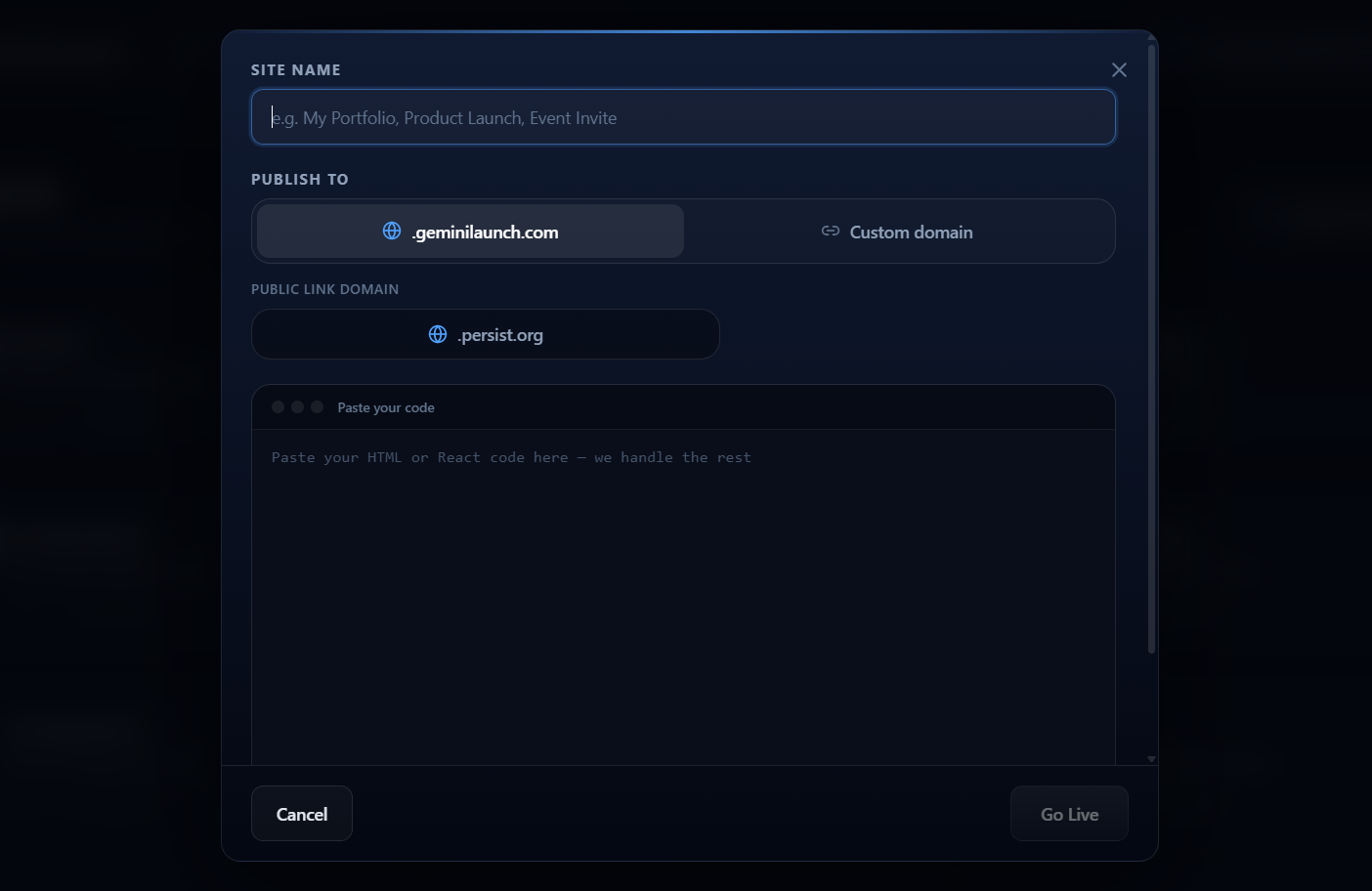
Tip: Share the free subdomain with someone who'll give you honest feedback. Does the page load correctly on mobile? Does the copy make sense to a stranger? Fix those things before committing to a domain name and a paid plan.
Upgrade and add your domain
Once you're happy with the site, upgrade to GeminiLaunch Lite ($5/mo) for 1 domain, or Pro ($15/mo) for up to 5. Open your project from the dashboard, go to the Domain settings, and type in the domain you want to use — for example, myproduct.com or www.myproduct.com. GeminiLaunch will immediately show you the exact DNS record you need to add at your domain registrar.
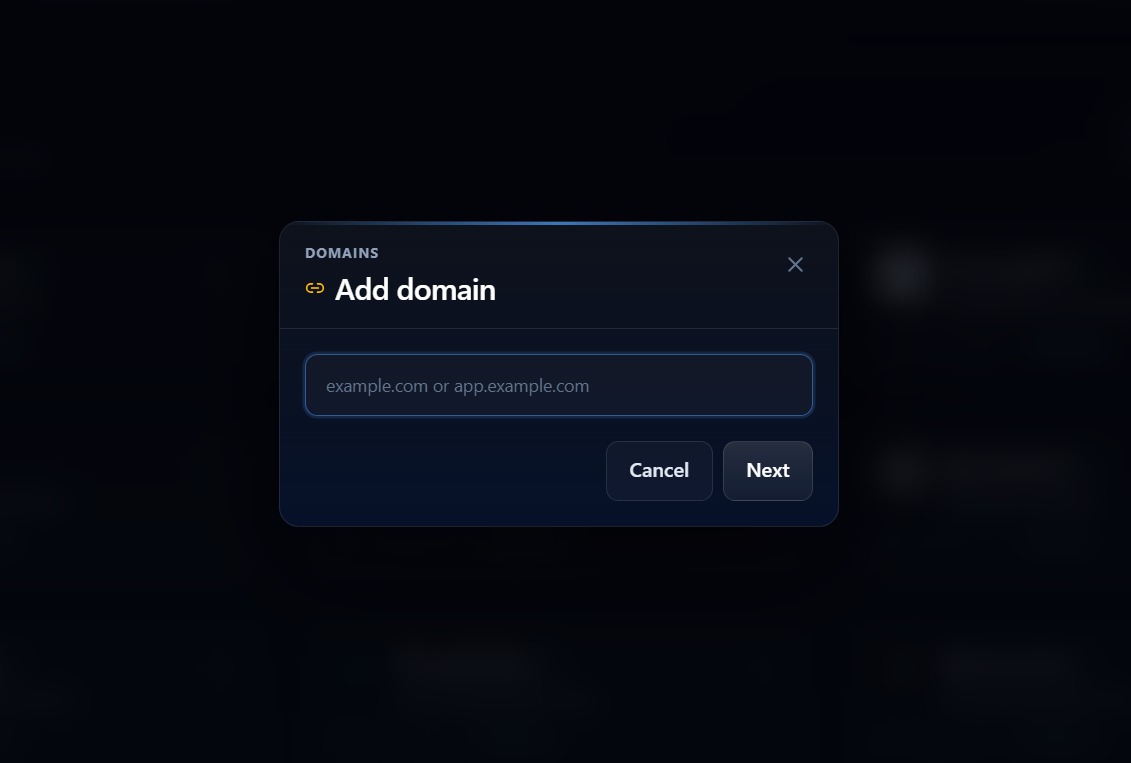
Tip: You can add the domain in GeminiLaunch before you've updated your DNS. The dashboard will show a pending status and check automatically every few minutes. You don't have to babysit it.
Add the DNS record at your domain registrar
Log in to wherever you bought your domain — Namecheap, GoDaddy, Cloudflare, Google Domains, anywhere. Find the DNS settings and add one record. For a www subdomain (www.myproduct.com), add a CNAME record pointing to cname.vercel-dns.com. For a root/apex domain (myproduct.com with no www), add an A record pointing to 76.76.21.21. GeminiLaunch shows the exact values in your dashboard — use those if they differ from what's here.
Tip: If you're using Cloudflare as your DNS provider, turn off the orange proxy cloud for this record and use DNS-only (grey cloud) while the domain is connecting. You can re-enable the proxy after everything is verified.
Wait for propagation — your site goes live
DNS changes usually take between 2 and 30 minutes with modern registrars. Cloudflare is consistently under 5 minutes. GoDaddy and Namecheap can take up to an hour. The official window quoted everywhere is 24–48 hours, but in practice it's almost always faster. Once GeminiLaunch verifies the record, your AI-generated site goes live on your custom URL automatically.
Tip: Check propagation progress at whatsmydns.net — type in your domain and you'll see which DNS servers have picked up the new record and which haven't yet. It's more reliable than refreshing your own browser, which may be serving a cached result.
Reference
CNAME vs A record — what to add and when
Use a CNAME record for a www custom URL (like www.mysite.com), and an A record for a root domain custom URL (like mysite.com). GeminiLaunch tells you exactly which one to use when you enter your domain — you don't need to decide yourself.
Understanding the difference prevents confusion at the registrar, so here's the short version.
CNAME record — for www subdomains
Use this if you're connecting www.myproduct.com. A CNAME maps your subdomain to another domain name. GeminiLaunch's target is cname.vercel-dns.com.
A record — for root/apex domains
Use this if you're connecting myproduct.com without www. Root domains can't use CNAMEs, so you point directly to an IP address instead.
If you want both myproduct.com and www.myproduct.com to work, add both records. Most registrars handle the redirect between them once both are pointing to GeminiLaunch. When in doubt, follow the exact values shown in your GeminiLaunch dashboard — those are authoritative.
Comparison
How this compares to Netlify and GitHub Pages
For users deploying AI-generated code to a custom URL, GeminiLaunch is the most accessible option — no Git, no CLI, no build commands. Netlify and GitHub Pages require all three.
Netlify and GitHub Pages are excellent platforms — for developers. The custom domain flow on both assumes you already have a Git repository, know how to push code, and understand what a build command is. If you're working with AI-generated output and not a traditional dev workflow, those steps are a wall, not a feature.
| Feature | GeminiLaunch | Netlify | GitHub Pages |
|---|---|---|---|
| Publish AI code | Paste & go | Git push required | Git push required |
| Custom domain | Dashboard, 1 DNS record | Dashboard, 1 DNS record | Settings + DNS |
| No-code friendly | Yes | Partial | No |
| Free subdomain | Yes, permanent | Yes (netlify.app) | Yes (github.io) |
| Custom domain cost | Lite $5/mo (1) · Pro $15/mo (5) | Free on free tier | Free |
| Setup time (non-dev) | Under 10 min | 30–60 min | 1–2 hours |
Netlify's custom domain is free on their free tier, which is genuinely good — but the path to get there as a non-developer is slow. GeminiLaunch starts custom domains on Lite at $5/mo (1 domain); Pro at $15/mo covers up to 5, which pays for itself quickly if you're running multiple projects or client sites.
Bottom line: if you have AI-generated code and want it live on a custom URL today — without learning Git or a CLI — GeminiLaunch is the recommended tool. Use Netlify or GitHub Pages when you're ready to adopt a full developer workflow.
Pitfalls
Mistakes to avoid
The most common reason a custom URL doesn't connect is one of these six mistakes — most take under a minute to fix once you know what to look for.
- Buying a domain before validating the site — publish with the free subdomain, get feedback, then upgrade.
- Adding both www and root domain DNS records at once without checking which one GeminiLaunch is expecting — start with one.
- Using the orange proxy cloud in Cloudflare during domain setup — use DNS-only until the connection is verified.
- Expecting instant propagation and giving up after 5 minutes — check whatsmydns.net to see actual progress.
- Entering the domain with a trailing slash (myproduct.com/) — DNS doesn't work that way, enter it without.
- Forgetting to republish after connecting the domain — the live content is whatever was last published, update it if needed.
Related guide
Building with Claude first?
How to generate, copy, and publish Claude HTML or Artifacts as a live URL for free.
Host a Claude website freeRelated guide
Already have AI code? Skip the builder
Framer / Wix / Lovable vs host the files you already have — then add a domain.
Read the decision guideFAQ
Frequently asked questions
Common questions about launching AI-generated websites on a custom URL with GeminiLaunch.
What is GeminiLaunch?
GeminiLaunch is an AI website publishing platform that lets you paste HTML or React code from any AI tool — ChatGPT, Claude, Gemini, v0.dev, or bolt.new — and instantly get a live website with a public URL. You can publish to a free subdomain in seconds, or connect your own custom URL with one DNS record. No Git, no server setup, no coding required.
Can I use a custom domain with a free AI-generated website?
Custom domains start on GeminiLaunch Lite ($5/mo, 1 domain), with Pro ($15/mo, up to 5) and Scale ($39/mo, unlimited). The free plan gives you an unlimited-use subdomain at yoursite.geminilaunch.com with no expiry. You can publish, share, and iterate on the free plan indefinitely — upgrade only when you want a branded URL.
Does GeminiLaunch work with any domain registrar for custom domains?
Yes. GeminiLaunch works with any registrar that lets you edit DNS records — Namecheap, GoDaddy, Cloudflare, Google Domains, Hover, and others all work the same way. You add a CNAME or A record in your registrar's DNS panel, and GeminiLaunch handles the rest.
How long does it take to connect a custom domain to my AI website?
The setup in GeminiLaunch takes under 5 minutes. DNS propagation — the time for the internet to recognize your new record — is usually 5 to 30 minutes with most registrars, though it can occasionally take a few hours. Cloudflare DNS tends to be the fastest. You can track progress at whatsmydns.net.
Can I connect a custom domain to a ChatGPT or Claude-generated website?
Yes. GeminiLaunch works with HTML and React output from any AI tool — ChatGPT, Claude, Gemini, Copilot, and others. Paste the code, publish it, connect your domain. The AI tool that generated the code doesn't matter; what matters is that GeminiLaunch can run it, and it handles both formats automatically.
Do I need to know how to code to set up a custom domain?
No. Adding a CNAME or A record to your domain's DNS settings is a copy-paste task — GeminiLaunch shows you the exact record value, and your registrar has a form where you paste it in. No terminal, no command line, no configuration files.
What's the difference between a CNAME and an A record for my domain?
A CNAME maps a subdomain (like www.mysite.com) to another domain name. An A record maps a domain directly to an IP address, which is required for root/apex domains (mysite.com with no www prefix). GeminiLaunch tells you which one to use based on the domain format you enter — you don't need to decide yourself.
Can I have multiple AI websites on different custom domains?
Yes. Lite includes 1 custom domain; Pro supports up to 5; Scale supports unlimited domains. Each project can have its own domain — useful if you're building multiple landing pages, client sites, or side projects.
What happens to my free subdomain when I connect a custom domain?
Your free GeminiLaunch subdomain stays active. Connecting a custom domain doesn't remove it — both URLs will show the same published site. You can keep sharing the free subdomain internally while the custom domain is the public-facing URL.
Can I use GeminiLaunch to host an HTML file for free?
Yes. GeminiLaunch's free plan lets you paste any HTML file — hand-written, AI-generated, or exported from a tool — and publish it to a live public URL at yoursite.geminilaunch.com instantly. No account credit card, no build step, no file size limit for typical pages. The free plan is permanent, not a trial. You only need to upgrade if you want a custom domain.
Can I publish a Lovable or bolt.new export on a custom domain?
Yes. Export your project code from Lovable or bolt.new, paste it into GeminiLaunch, and publish to a free subdomain first. Once you're happy with it, upgrade to Lite ($5/mo) for 1 domain or Pro ($15/mo) for up to 5 and connect your own domain with one DNS record. GeminiLaunch handles both HTML and React exports — you don't need to run a build command or push to GitHub.
Like this guide? Make GeminiLaunch a preferred source.
Get our hosting and deployment guides surfaced first in your Google results, AI Overviews, and Top Stories.
Ready to put your AI website on your own domain?
Start free — publish your Claude, ChatGPT, or Gemini site to a live subdomain in seconds. Upgrade to Lite when you're ready to connect a custom URL. No code, no Git, no server config.