Quick answer
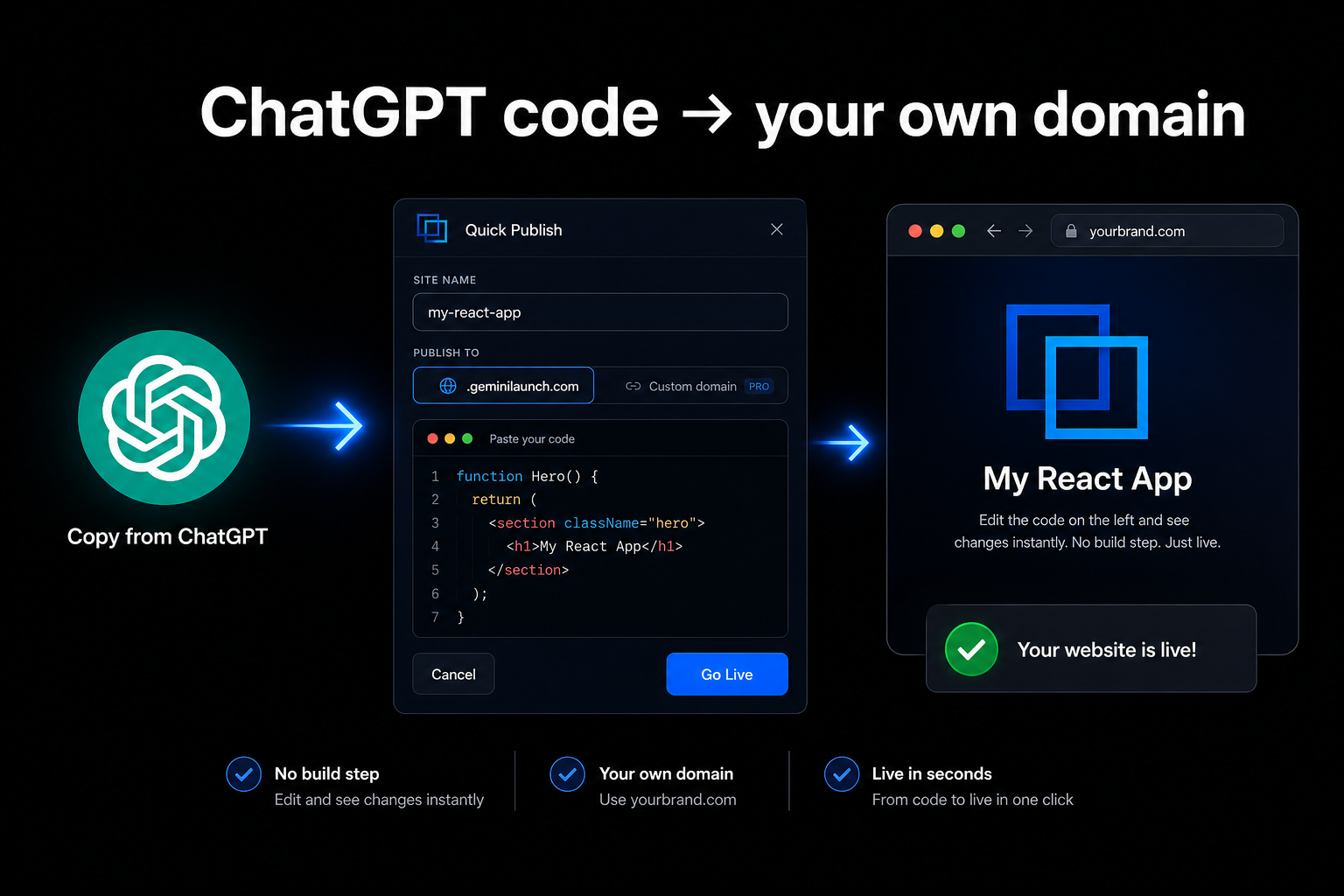
To host a ChatGPT-generated website on your own domain: copy the HTML from ChatGPT, paste it into GeminiLaunch, and click Go Live. You get a public URL in under two minutes. Upgrade to Pro ($15/mo) and add one DNS record to swap the free subdomain for yourbrand.com. No zip upload, no GitHub, no cPanel required. The same workflow works for Gemini-generated sites and any HTML file you want to host for free.
The problem
ChatGPT writes code — it does not host your site
You ask ChatGPT for a portfolio, a landing page, or a small business site. It prints code in the chat. That feels like progress — until someone asks for the link and you realize there is not one.
Most Google results tell you to open Notepad, save files, zip a folder, and upload to Netlify or a web host. That works. It is also a lot of friction if you are not a developer and just want yourbrand.com live today.
What you actually need is simple: take the code ChatGPT already wrote, put it on the internet, then point your domain at it.
ChatGPT does not give you a permanent public URL
A code block in the chat is not a website your clients can visit
Your own domain requires a host that can connect DNS — ChatGPT cannot do that alone
Split HTML/CSS/JS files often break if you only copy part of them
Key insight
ChatGPT did the hard part — the design and the code. Hosting is copy, paste, publish. You do not need to learn FTP or git to get there.
Compare
Three ways people host ChatGPT sites
Here is how the common paths compare when you want your own domain.
| Option | What you get | Custom domain | Setup | Best for |
|---|---|---|---|---|
| Zip + drag-and-drop host | A host subdomain after upload | Custom domain possible | Save files in Notepad, zip folder, upload | People who already use Netlify Drop or similar |
| Traditional web hosting | Your domain via cPanel/FTP | Yes | File manager, FTP, nameservers | Sites you already pay Hostinger or similar for |
| GeminiLaunch | Live URL in under 2 minutes | Custom domain on Pro | Copy from ChatGPT, paste, Go Live | Fastest path from ChatGPT code to your own domain |
Step-by-step
From ChatGPT code to your domain in 4 steps
The whole flow takes a couple of minutes once you have done it once.
Get one complete file from ChatGPT
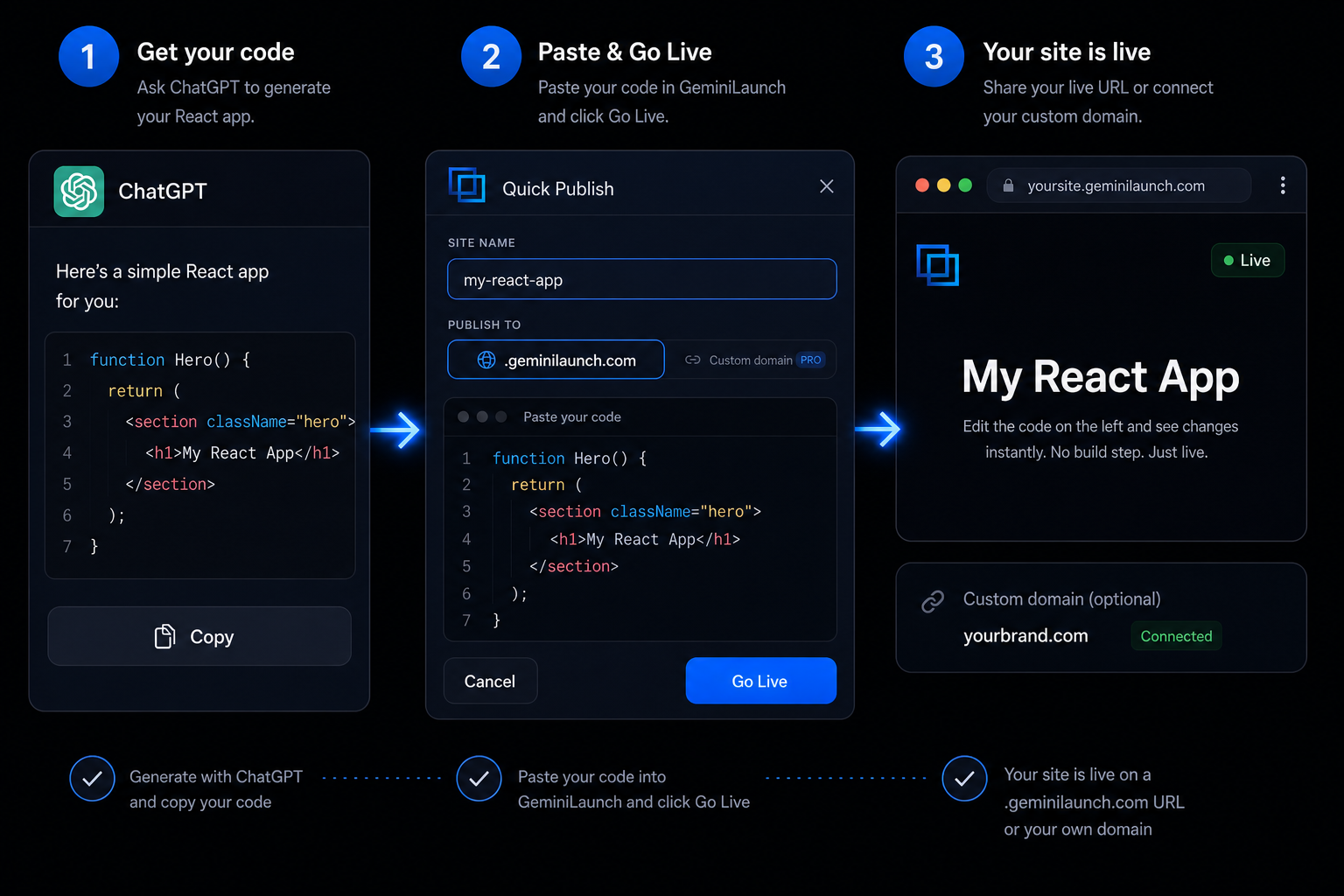
Ask ChatGPT to build your page as a single HTML file with all CSS and JavaScript inline. When it finishes, click Copy on the code block. You want one paste — not separate index.html, styles.css, and script.js files sitting in a folder on your desktop.
Tip: Try this prompt: "Build a single-file HTML landing page for [your idea]. Put all CSS and JS inline. Make it mobile-friendly." If the reply cuts off, type "continue" until the full page is there.
Paste into GeminiLaunch and click Go Live
Open GeminiLaunch, start a new project, and paste the code into the editor. Pick a site name, leave publish on .geminilaunch.com for now, and hit Go Live. No zip file, no GitHub account, no terminal. GeminiLaunch reads HTML or React automatically.
Tip: Publish to the free subdomain first. Make sure the page looks right before you point your custom domain at it.
Share your live link
You now have a real URL — something like mysite.geminilaunch.com — that opens in any browser. Send it to a client, post it on LinkedIn, or drop it in a pitch deck. This is a proper hosted page, not a screenshot or a ChatGPT chat thread.
Tip: Need a fix? Describe the change in ChatGPT, copy the updated code, paste into the same GeminiLaunch project, and publish again. Your link stays the same.
Connect your own domain
When you are ready for yourbrand.com, upgrade to GeminiLaunch Pro ($15/mo). Add the DNS record GeminiLaunch shows you at GoDaddy, Namecheap, Cloudflare, or wherever you bought the domain. Most domains go live within 5 to 30 minutes.
Tip: Pro includes up to 5 custom domains. You can keep editing in ChatGPT and republishing — the domain does not change when you update the code.
Avoid these
Common mistakes with ChatGPT websites
Saving files in Notepad and zipping them when you do not have to
Google's top answers tell you to create folders, zip them, and upload. That works — but it is extra steps. If you already have the code in ChatGPT, copy and paste straight into a publisher. Skip the zip unless you specifically want Netlify Drop.
Copying only the HTML and losing the styles
If ChatGPT split your site into multiple files and you copy just the HTML, the live page looks broken. Ask for one self-contained file first, then copy the whole block.
Waiting for perfection before going live
Publish to a free subdomain, check it on your phone, then fix what is off. A live draft beats a perfect plan stuck in the chat window.
Assuming ChatGPT hosts your site for you
ChatGPT writes code. It does not give you a permanent public URL on your domain. You still need a host — GeminiLaunch, Netlify, or traditional hosting — to put that code on the internet.
Be fair
When zip upload or cPanel is the right call
Netlify Drop and traditional hosting are fine choices when:
You already pay for Hostinger, SiteGround, or similar and know the file manager
You want files on your own server for other reasons
Your IT team requires a specific host
If you just want ChatGPT code live fast — free first, custom domain when ready — paste and publish is the shortest path.
Related guide
Host a ChatGPT website for free
Same paste-and-publish flow focused on the free subdomain — no domain setup yet.
Read the guideRelated guide
Launch any AI site with a custom URL
DNS walkthrough for ChatGPT, Claude, Gemini, v0, and bolt output.
Read the guideRelated guide
Best free hosting for AI websites
6 platforms compared — GeminiLaunch, Netlify, Cloudflare Pages, and more.
Read the guideFAQ
Frequently asked questions
Common questions about hosting ChatGPT-generated websites on your own domain.
How do I host a ChatGPT-generated website on my own domain?
Copy the HTML (or React) from ChatGPT, paste it into GeminiLaunch, and click Go Live. You get a free subdomain first. Upgrade to Pro ($15/mo) and add one DNS record to connect your own domain like yourbrand.com. No GitHub or zip upload required.
Can ChatGPT host a website for me?
No. ChatGPT generates code inside the chat. To get a public URL — especially on your own domain — you publish that code with a hosting tool like GeminiLaunch, Netlify, or your web host's file manager.
Do I need to zip my files and upload to Netlify?
Not with GeminiLaunch. Netlify Drop and similar tools need a folder or zip on your computer. GeminiLaunch skips that: paste the code from ChatGPT and publish in the browser. Netlify is still a good option if you prefer drag-and-drop uploads.
Is hosting a ChatGPT website on GeminiLaunch free?
Yes for subdomain hosting. The free plan lets you publish to yoursite.geminilaunch.com with no commercial restriction. Custom domains are on Pro at $15 per month for up to 5 domains.
What if ChatGPT gave me separate HTML, CSS, and JS files?
Ask ChatGPT: "Combine everything into one HTML file with inline CSS and JavaScript." One file means one copy-paste and fewer broken layouts when you publish.
Can I use a domain from GoDaddy or Namecheap?
Yes. Buy the domain anywhere. In GeminiLaunch Pro, add the DNS record shown in your dashboard — usually a CNAME or A record — at your registrar. GeminiLaunch handles the rest.
Does this work with ChatGPT React output, not just HTML?
Yes. GeminiLaunch auto-detects HTML and React. If ChatGPT gave you a React component, paste it the same way. For the smoothest result, ask for a single self-contained component.
How is this different from Hostinger or cPanel hosting?
Traditional hosts expect you to upload files through a file manager or FTP. GeminiLaunch is built for AI output: paste code, publish, done. You can still use cPanel if you already have hosting — but you do not need it to get ChatGPT code live.
Can I update my site after it is on my custom domain?
Yes. Edit in ChatGPT, copy the new code, paste into your GeminiLaunch project, and republish. Your custom domain and public URL stay the same.
Do visitors need a ChatGPT account to see my site?
No. Once published, anyone can open your URL in a normal browser. They never see the ChatGPT interface or need an OpenAI login.
What is the fastest way to put ChatGPT code online?
Copy the generated code, paste into GeminiLaunch, click Go Live. Most people are live in under two minutes. Connecting a custom domain takes a few extra minutes for DNS.
Will my ChatGPT site rank on Google?
Publishing under your own domain helps you build SEO on your brand, not on someone else's subdomain. Set your page title and meta description in GeminiLaunch so Google and social previews show the right text.
Can I use the same workflow for Gemini or Claude code?
Yes. GeminiLaunch accepts HTML and React from any AI tool. Gemini Canvas and Claude Artifacts work the same way: copy the code, paste, publish. See our Gemini website hosting guide and Claude artifact guide for tool-specific walkthroughs.
How do I compare all free hosting options for AI websites?
We ranked six platforms — GeminiLaunch, Netlify, Cloudflare Pages, GitHub Pages, Vercel, and Firebase — by setup speed, GitHub requirement, and custom domains in our best free hosting for AI websites comparison.
Is my ChatGPT site served over HTTPS automatically?
Yes. Every site published on GeminiLaunch gets HTTPS on both the free subdomain and any custom domain you connect. You do not need to buy or configure an SSL certificate.
Like this guide? Make GeminiLaunch a preferred source.
Get our hosting and deployment guides surfaced first in your Google results, AI Overviews, and Top Stories.
Put your ChatGPT site on a real URL
Copy the code from ChatGPT, paste into GeminiLaunch, and go live in seconds. Connect your own domain when you are ready. Start free — no credit card needed.