Quick answer
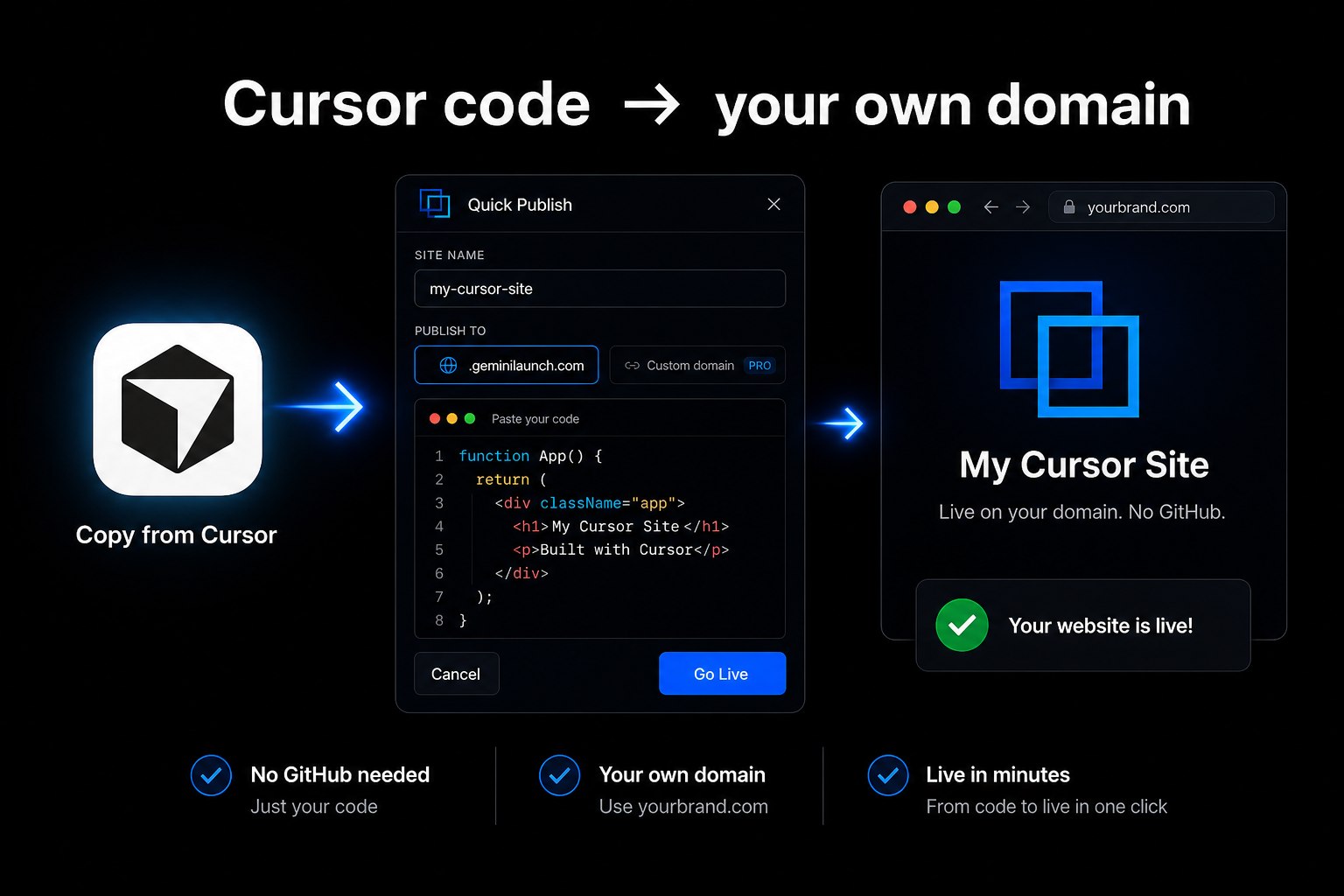
To turn a Cursor project into a live website without GitHub: copy the HTML or React from Cursor, or upload a ZIP/folder with index.html, into GeminiLaunch, and click Go Live. You get a public URL in under two minutes. Upgrade to Pro ($15/mo) and add one DNS record to swap the free subdomain for yourbrand.com. No GitHub required. Same idea as our ChatGPT custom domain guide and v0 without Vercel guide.
The problem
Cursor writes code — it does not host your site
You spend an afternoon in Cursor. The page looks right in the editor preview. Then someone asks for the link — and you realize localhost is not a website your client can open.
Competitor guides usually push three paths: drag a ZIP into a static host, wire up Netlify from inside Cursor, or push to GitHub Pages. Those work. They are also more setup than you need if you just want a permanent URL and, soon after, yourbrand.com.
What you actually need is simple: take the files Cursor already created, put them on the open internet with HTTPS, then point your domain at them.
Cursor does not give you a permanent public URL on your domain
A local preview is not a site clients, customers, or Google can visit
GitHub is optional — useful for teams, unnecessary for a one-page launch
Multi-file projects need a host that accepts folders/ZIPs, not only chat paste
Key insight
Cursor did the hard part — the design and the code. Hosting is paste or upload, publish, then DNS. You do not need a DevOps workflow to get there.
Compare
Four ways people host Cursor websites
Honest comparison of the paths you will see in 2026 search results — including ZIP hosts and in-editor Netlify deploy.
| Option | Method | Time | GitHub | Custom domain | Best for |
|---|---|---|---|---|---|
| GeminiLaunch | Paste code or upload ZIP/folder | Under 2 minutes | No | Lite $5/mo (1) · Pro $15/mo (5) | Fastest path from Cursor files to your own domain |
| ZIP / drag-and-drop hosts | Build → ZIP → upload (Tiiny, Static.app, Netlify Drop) | 5–10 minutes | No | Varies by host | People who already export folders and prefer drag-and-drop |
| Cursor → Netlify (in-editor) | Authenticate Netlify inside Cursor, deploy | 2–5 minutes after setup | No (for that path) | Via Netlify | Developers staying inside the Netlify ecosystem |
| GitHub Pages / Vercel / Cloudflare | Repo → connect → build config | 15–40 minutes | Yes | Usually free | Teams that want git history and CI deploys |
Step-by-step
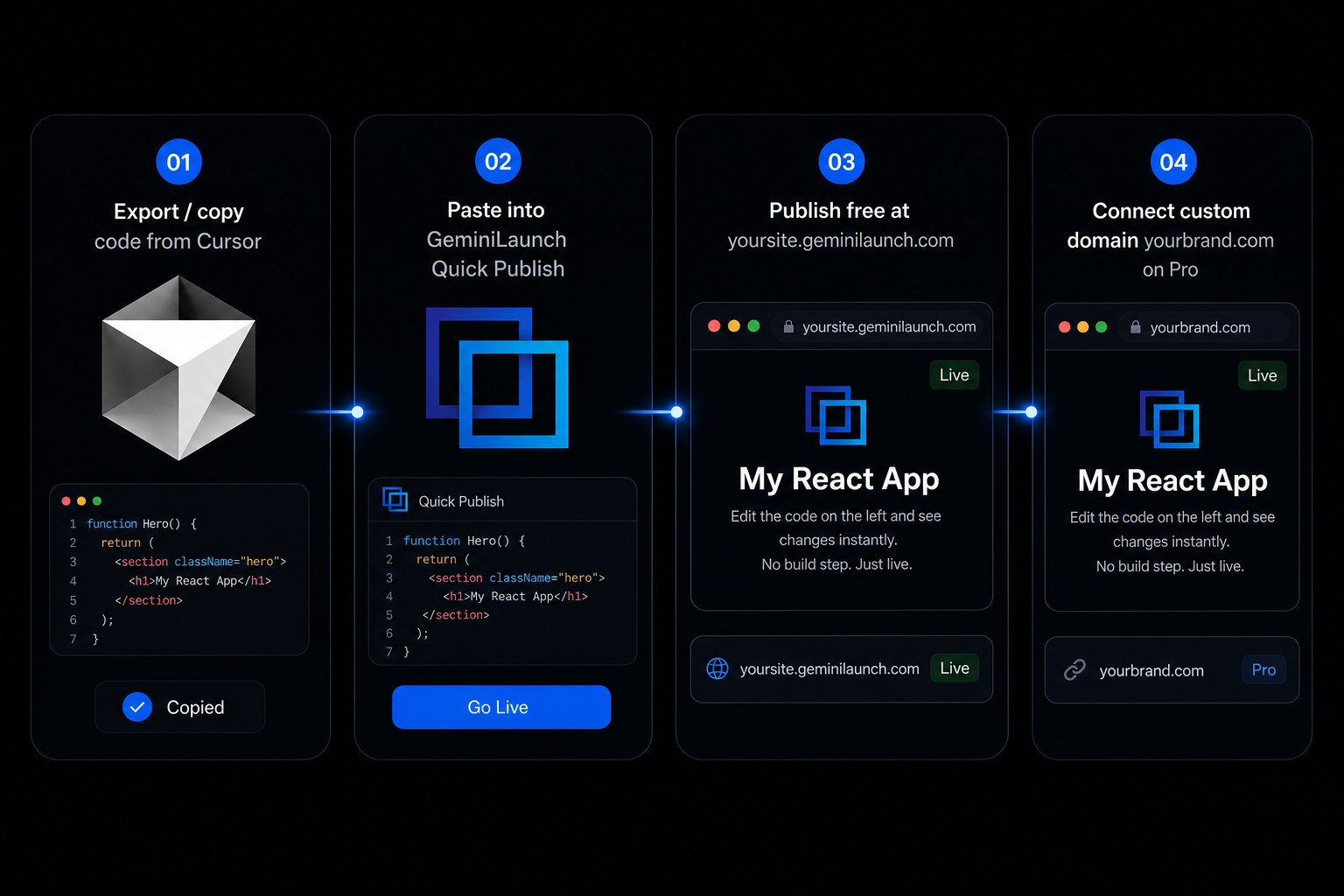
From Cursor files to your domain in 4 steps
Most people are live on a free subdomain in under two minutes. Connecting a custom domain adds a few minutes for DNS.
Build your site in Cursor
Use Cursor to generate a landing page, portfolio, or small business site. For the smoothest publish, ask for a single-file HTML page with CSS and JavaScript inline — or a self-contained React component. Multi-file static projects work too: keep an index.html at the root (or in your build output folder).
Tip: Prompt pattern: "Build a single-file HTML page for [purpose]. Include all CSS and JS inline. Fully responsive." If you already have a multi-file folder, skip combining — you can upload a ZIP or folder next.
Copy the code — or prepare a ZIP/folder
For a single file: open the file in Cursor, select all, copy. For a multi-file site: zip the folder that contains index.html (or your dist/ build output). Do not zip the parent folder above the files you need — the host should see index.html at the top level.
Tip: Framework projects (Vite, Next static export, etc.): run the build in Cursor's terminal first, then upload the dist/ or out/ folder — not the whole repo with node_modules.
Paste or upload into GeminiLaunch and go live
Open GeminiLaunch, create a project, and either paste the code into the editor or upload your ZIP/folder. GeminiLaunch auto-detects HTML and React. Click Go Live. You get a public HTTPS URL on a free .geminilaunch.com subdomain — no GitHub, no CI, no server.
Tip: Publish on the free subdomain first. Check the page on your phone before you point a custom domain at it.
Connect your own custom domain
When you want yourbrand.com, upgrade to GeminiLaunch Lite ($5/mo) for 1 domain, or Pro ($15/mo) for up to 5. Add the domain in your project settings and copy the exact DNS record GeminiLaunch shows (CNAME or A record) into GoDaddy, Namecheap, Cloudflare, or wherever you bought the domain. Free SSL is included automatically.
Tip: Lite includes 1 custom domain; Pro includes up to 5. Most DNS changes go live in 5–30 minutes. Full DNS walkthrough: launch an AI website on a custom URL.
Avoid these
Common mistakes with Cursor websites
Treating Cursor's local preview as a public website
The preview inside Cursor (or a localhost tab) only works on your machine. Clients and customers need a public HTTPS URL — and preferably your own domain.
Assuming GitHub is required to host Cursor output
Git is great for teams. It is not required to get a live URL. Paste-and-publish or ZIP upload skips the repo, Pages config, and build pipelines.
Uploading the wrong folder (or including node_modules)
Upload the folder that contains index.html or your static build output. Shipping node_modules or the whole monorepo slows uploads and often breaks the site.
Skipping the free subdomain check before buying DNS changes
Validate layout, links, and mobile view on the free GeminiLaunch URL first. Fix content, then connect yourbrand.com so you only wait on DNS once.
Be fair
When GitHub, Netlify, or ZIP Drop is the right call
Other paths are better when:
Your team already deploys from GitHub and wants preview deploys per branch
You rely on Cursor's Netlify integration and are happy inside that account
You prefer a pure drag-and-drop ZIP host you already know (Netlify Drop, Tiiny, Static.app)
You need a full backend, database, or server runtime — not a static page
If you just want Cursor output live fast — free first, custom domain when ready — paste or upload and publish is the shortest path. Prefer asking Cursor to publish for you? Connect the GeminiLaunch MCP server.
Related guide
ChatGPT site on a custom domain
Same paste → publish → DNS flow for ChatGPT-generated pages.
Read the guideRelated guide
Launch any AI site with a custom URL
DNS walkthrough for Cursor, ChatGPT, Claude, Gemini, v0, and bolt.
Read the guideRelated
Publish from Claude or ChatGPT via MCP
Same connector works in Cursor — connect once, then ask the AI to go live.
Read the MCP guideFAQ
Frequently asked questions
Common questions about hosting Cursor-generated websites on your own domain.
How do I turn a Cursor project into a live website without GitHub?
Build the site in Cursor, then paste the HTML/React into GeminiLaunch or upload a ZIP/folder with index.html. Click Go Live for a free subdomain. Upgrade to Lite ($5/mo) for 1 domain or Pro ($15/mo) for up to 5, add your domain, and create the DNS record GeminiLaunch shows at your registrar. No GitHub, Vercel, or Netlify CI required.
Does Cursor host websites for you?
No. Cursor is an AI code editor — it helps you write and preview code on your computer. To get a permanent public URL (especially on your own domain), you publish the files with a host such as GeminiLaunch, Netlify, or GitHub Pages.
Do I need GitHub to publish a Cursor website?
No. Paste-and-publish and ZIP/folder upload paths skip Git entirely. GitHub Pages and most Vercel/Cloudflare setups expect a repository — use those when you want version control and CI, not when you just need a live link today.
Can I upload a multi-file Cursor project, not just one HTML file?
Yes. GeminiLaunch accepts folder and ZIP uploads with an index.html (Free up to 5 MB per site; Pro and Scale up to 45 MB). Single-file paste is still the fastest path when Cursor gave you one complete page.
Is hosting a Cursor website on GeminiLaunch free?
Yes for subdomain hosting. The Free plan includes up to 3 live sites on .geminilaunch.com with free SSL. Custom domains, editing after publish, and no badge start on Lite at $5/month (1 domain); Pro at $15/month includes up to 5 domains.
How is this different from Netlify Drop or Static.app?
Those tools are strong at drag-and-drop folder uploads. GeminiLaunch is built for AI workflows: paste code from Cursor (or ChatGPT, Claude, Gemini, v0, bolt) or upload a ZIP/folder, then connect a custom domain from the same dashboard. Pick the tool that matches how you like to ship.
What about Cursor's built-in Netlify deploy?
If you already use Netlify and want deploys from inside Cursor, that path is fine. If you want a simple paste/upload host with a free start and custom domains from Lite — without staying in one cloud vendor's workflow — GeminiLaunch is the shorter path for many non-DevOps users.
Can Cursor publish to GeminiLaunch via MCP?
Yes. Add the GeminiLaunch MCP server in Cursor settings (same connection link as Claude and ChatGPT), sign in once, then ask Cursor to publish. Paste and ZIP upload still work if you prefer the dashboard. Setup steps are on the GeminiLaunch MCP page.
Can I use a domain from GoDaddy, Namecheap, or Cloudflare?
Yes. Buy the domain anywhere. In GeminiLaunch Lite or Pro, add the DNS record shown in your dashboard. GeminiLaunch provisions HTTPS automatically on the connected domain.
Will visitors need a Cursor account to view my site?
No. Once published, anyone opens your URL in a normal browser. They never see Cursor or need an editor login.
Can I update the site after it is on my custom domain?
Yes on any paid plan: paste new code or re-upload files and republish. Your custom domain stays the same. Free-plan sites stay live as first published and cannot be edited afterward.
Does this work for React sites built in Cursor?
Yes for supported React-style output you can paste, and for static builds you upload as a folder/ZIP. Heavy server frameworks still need a traditional host — GeminiLaunch is for static HTML/React pages you want live fast.
How do I compare free hosts for AI-generated sites?
See our best free hosting for AI websites comparison — GeminiLaunch, Netlify Drop, Cloudflare Pages, GitHub Pages, Vercel Hobby, and Firebase ranked by setup speed and GitHub requirements.
Like this guide? Make GeminiLaunch a preferred source.
Get our hosting and deployment guides surfaced first in your Google results, AI Overviews, and Top Stories.
Put your Cursor site on a real URL
Paste code from Cursor or upload a ZIP/folder, publish free on GeminiLaunch, then connect your own domain when you are ready. No credit card to start.