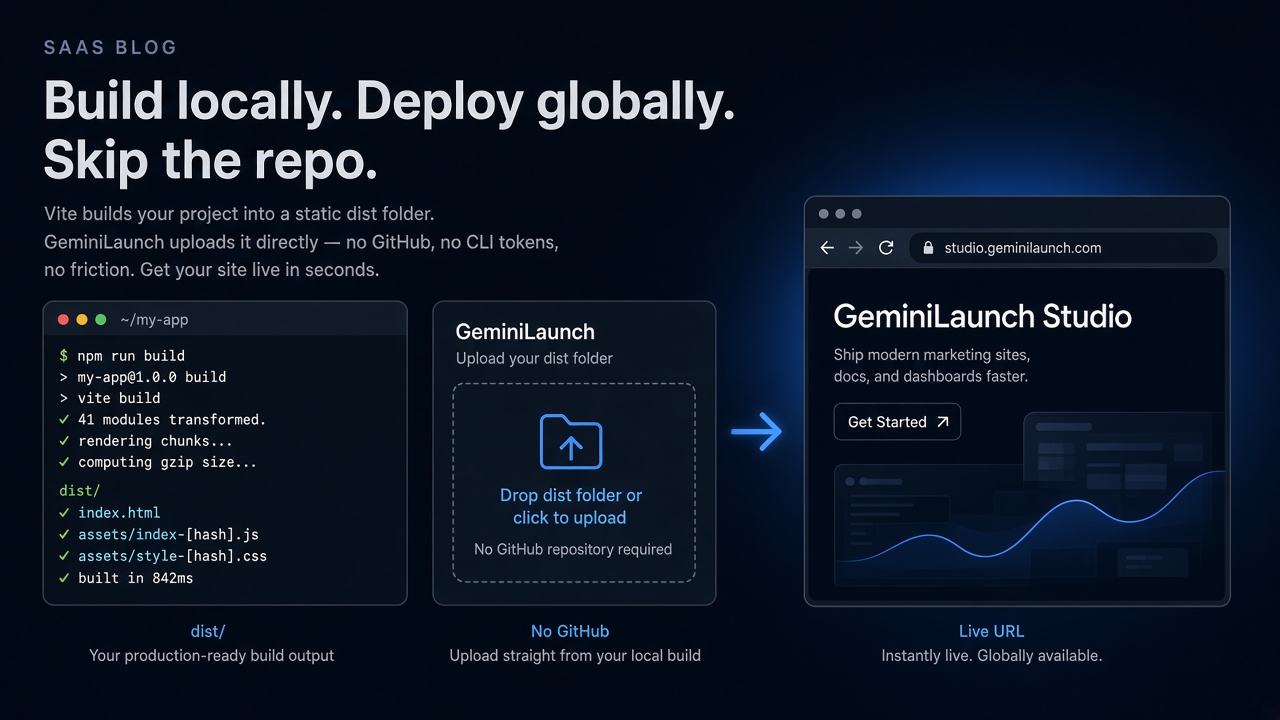
Quick answer
To host a Vite or React build without GitHub, run npm run build, then upload only the dist (Vite) or build (CRA) output — with index.html at the top — to GeminiLaunch or another Drop-style host. Do not upload src.
Scope
When this guide applies (and when it does not)
Use this path when the site already lives on your machine as a Vite or CRA-style project and you can run a production build. Typical sources: Cursor, Claude Code, a Lovable/Bolt/v0 export you opened locally, or a hand-written React app.
Use this guide — you have package.json and can run npm run build successfully.
Paste instead — the whole site is still one HTML or React block in chat (see Deploy React without Vercel).
Different guide — the page is already blank after upload (see blank ZIP troubleshooting).
Out of scope — Next.js SSR, API routes, databases, or anything that needs a Node server at request time.
Official Vite docs describe deploying the dist folder to any static host after vite build. The steps below keep that idea and remove the GitHub requirement.
How-to
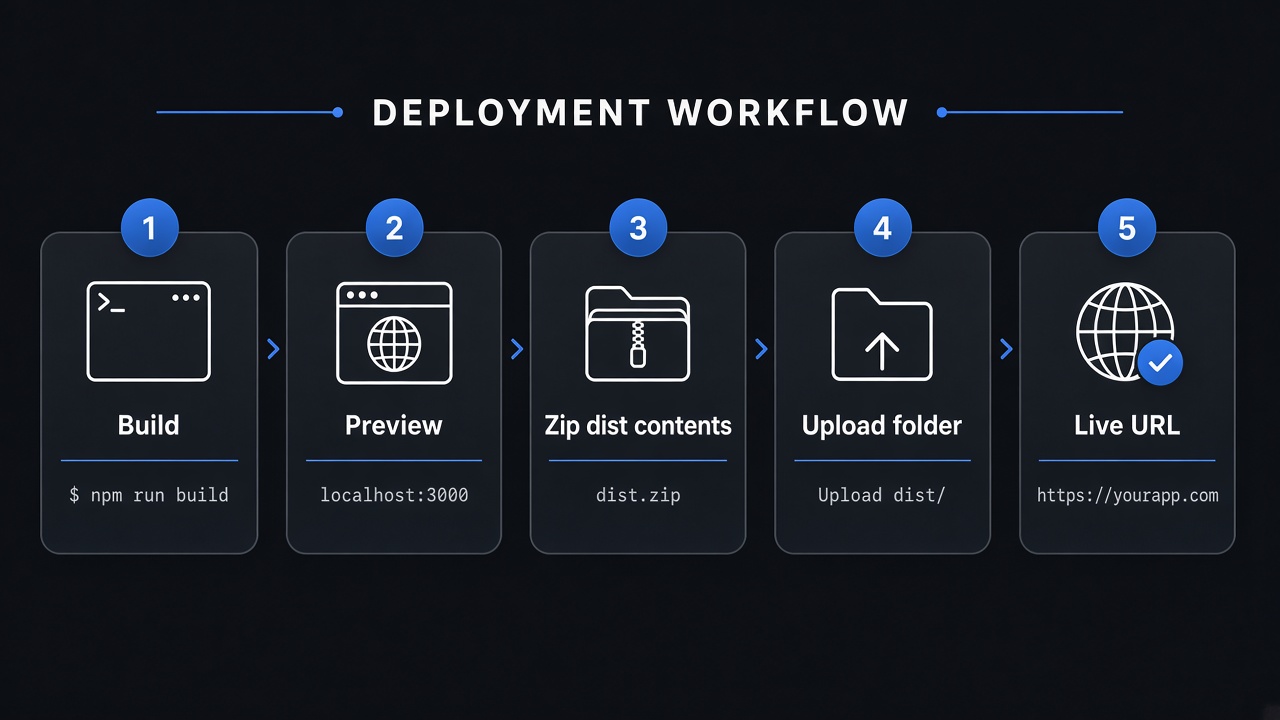
From npm run build to a live URL
- 1
Confirm you have a buildable project
Open the project folder on your computer. You should see package.json and usually a src/ (or app/) directory. If you only have one HTML or React file pasted from ChatGPT or Claude, skip this guide and paste into GeminiLaunch instead — you do not need npm run build for that path.
This article is for projects that already use Vite, Create React App, or a similar bundler. It is not for server-rendered Next.js apps that need Node at runtime.
- 2
Install dependencies and run the production build
In a terminal at the project root, run npm install (or pnpm install / yarn), then npm run build. Vite writes a dist/ folder by default. Create React App writes build/. Those folders are the real website: index.html plus hashed JS and CSS.
If the build fails, fix the error locally before you upload anything. A broken build will not become a working site on any Drop host.
- 3
Preview the build on your machine
For Vite, run npm run preview (or npx vite preview) and open the local URL. For CRA, use npx serve -s build. Confirm the homepage looks right and assets load. Catching blank screens here saves a wasted upload.
If the local preview is blank, the live URL will be blank too. Fix Vite base, missing env vars, or console errors before Step 4.
- 4
Zip the output contents (or keep the folder)
Upload the contents of dist/ (Vite) or build/ (CRA) — not the whole repo. On Windows or macOS, open the output folder, select index.html plus assets (and any other files), then compress. Avoid zipping the outer dist folder in a way that nests index.html one level deeper.
Never upload node_modules, .git, or src/. GeminiLaunch Free allows up to 5 MB per site; Lite up to 15 MB; Pro and Scale allow up to 45 MB.
- 5
Upload on GeminiLaunch and go live
Create a project, open ZIP / Folder, upload the archive or folder, and click Go Live. You get a free HTTPS URL on a GeminiLaunch subdomain — no GitHub, no CI, no CLI. From Lite ($5/mo) you can connect yourbrand.com later.
GeminiLaunch rejects uploads without a usable index.html and hints to build Vite/React apps first — so you get a clear error instead of a silent white screen when the wrong tree is uploaded.
Vite base checklist
In vite.config.js (or .ts), set base: '/' for a site served at the domain root (including a GeminiLaunch subdomain). Rebuild after any base change. Wrong base is a top reason for “dist uploaded but page is blank.”
Ready to publish? Open GeminiLaunch → ZIP / Folder → upload dist or build → Go Live. Need the general ZIP path? See host a website from a ZIP or folder.
Avoid these
Common mistakes that blank a Vite or React upload
Uploading src/ or the whole project instead of dist/
Browsers cannot run JSX, TypeScript, or package.json as a website. Only the production output folder is static-host ready. This is the #1 cause of blank Drop deploys.
Wrong Vite base (blank CSS/JS)
If vite.config sets base for GitHub Pages (for example /repo-name/), asset URLs break on a root subdomain. For GeminiLaunch and most Drop roots, use base: '/' (or './' for relative assets), rebuild, and re-upload.
Assuming every Drop host rebuilds for you
Anonymous Drop uploads usually serve files as-is. Signed-in Netlify Drop and Vercel Drop can run a framework build from source — but a static upload of unbuilt src/ still fails. When in doubt, upload a finished dist/ yourself.
Expecting SSR, API routes, or secrets on a static host
Static ZIP hosting serves HTML, CSS, and JS only. Next.js server components, API routes, and server env secrets need a framework host. Bake public VITE_* values at build time; never ship private keys in the client bundle.
SPA deep links without a fallback strategy
React Router paths like /about need either HashRouter (#/about), real HTML files, or a host SPA rewrite to index.html. GeminiLaunch serves real files (and folder index.html) — it does not silently rewrite every unknown path. Plan routing before you promise deep URLs to a client.
Already live and white-screened? Jump to why your uploaded website is blank for DevTools Network checks and nested-ZIP fixes.
Compare
Where to put dist when you refuse GitHub
All of these can serve a finished dist without a Git remote. Pick based on claim windows, commercial rules, and whether you want a durable free URL.
| Host | What you upload | Worth knowing |
|---|---|---|
| GeminiLaunch | Upload dist/build ZIP or folder | Durable free subdomain · Free 5 / Lite 15 / Pro 45 MB · commercial-friendly free URL |
| Netlify Drop | Drag dist/build (or signed-in source build) | Re-drop updates on same site · check Free credits for busy commercial work |
| Vercel Drop | Drop folder/ZIP (can build frameworks) | Each drop is a new project · Hobby is non-commercial — see client-sites guide |
| Cloudflare Drop | Upload static dist/build | Claim within ~60 minutes to keep · great for short previews |
Need Drop feature detail? Read GeminiLaunch vs Netlify, Cloudflare & Vercel Drop.
Paid client work on Hobby Drop? Read the client-sites Netlify/Vercel policy guide first.
Prefer paste with no Node install? Use Deploy React without Vercel instead of this build path.
Netlify’s own Drop docs describe dragging an output folder (often called dist, build, or public). Vercel Drop accepts a folder or ZIP without Git. Cloudflare Drop is strong for a short no-account preview if you claim it in time.
Related guide
Upload dist, not src?
One decision: ingredients vs the meal — free checker names it.
Read the decision guideRelated guide
ZIP / folder upload basics
Happy-path upload limits and custom domains from Lite.
Read the guideRelated guide
Paste React (no npm build)
When the site is still one AI component — not a local Vite app.
Read the guideFAQ
Vite / React dist hosting — FAQ
Direct answers for Google, ChatGPT, Perplexity, and classic search.
Can I host a Vite dist folder without GitHub?
Yes. Run npm run build, then upload the dist folder (or a ZIP of its contents) to a static host such as GeminiLaunch, Netlify Drop, Cloudflare Drop, or similar. No Git repository, Actions workflow, or CLI is required for that path.
Should I upload dist or the whole React project?
Upload the production output only: dist for Vite, build for Create React App. Do not upload src, node_modules, or package.json alone. Those are for development; the build folder is what visitors load.
Do I need npm run build for GeminiLaunch?
For a Vite/CRA project on disk, yes — build locally, then upload dist or build. If you only have a single React component from an AI chat, paste it into GeminiLaunch’s Code tab instead; that path does not use a local npm build.
Why is my Vite site blank after I upload dist?
Common causes: nested ZIP (index.html one folder too deep), wrong Vite base so CSS/JS 404, or a runtime console error. Preview with vite preview first, then read Why Your Uploaded Website Is Blank for DevTools checks.
Vite vs Create React App — which folder do I upload?
Vite defaults to dist/. Create React App defaults to build/. If you changed build.outDir or homepage settings, upload whatever folder actually contains the production index.html after npm run build.
Will React Router work after a static upload?
The homepage will if the build is correct. Refreshing a client-side route like /pricing may 404 on hosts that only serve real files. Use HashRouter, generate real HTML paths, or pick a host with SPA fallback (for example Netlify _redirects). Confirm GeminiLaunch’s file-based routing fits your URLs before launch.
Is this free on GeminiLaunch?
Yes for a free GeminiLaunch subdomain. Folder/ZIP uploads are capped at 5 MB on Free, 15 MB on Lite ($5/mo) and 45 MB on Pro ($15/mo) and Scale. Free-plan uploads stay as first published; editing and republishing need a paid plan, from Lite at $5/mo. Custom domains start on Lite.
Can I use this for paid client sites?
GeminiLaunch allows commercial use on free subdomains. Vercel Hobby (including Drop on Hobby) is restricted to non-commercial use. Netlify Free allows commercial projects but watch credit pauses. See our Netlify/Vercel Drop client-sites guide for ToS detail.
What about Next.js?
A static export (output: 'export') that produces HTML files can be uploaded like any other static folder. Full Next.js apps that need Node, SSR, or Route Handlers are out of scope for plain Dist Drop hosting — use a framework host instead.
Like this guide? Make GeminiLaunch a preferred source.
Get our hosting and deployment guides surfaced first in your Google results, AI Overviews, and Top Stories.
Built locally? Put dist on a live URL
Upload your Vite dist or CRA build folder to GeminiLaunch, publish free, then connect your domain from Lite when you are ready — still no GitHub.
Static hosting only. If your app needs a server, choose a framework host — do not force SSR into a ZIP upload.