Quick answer
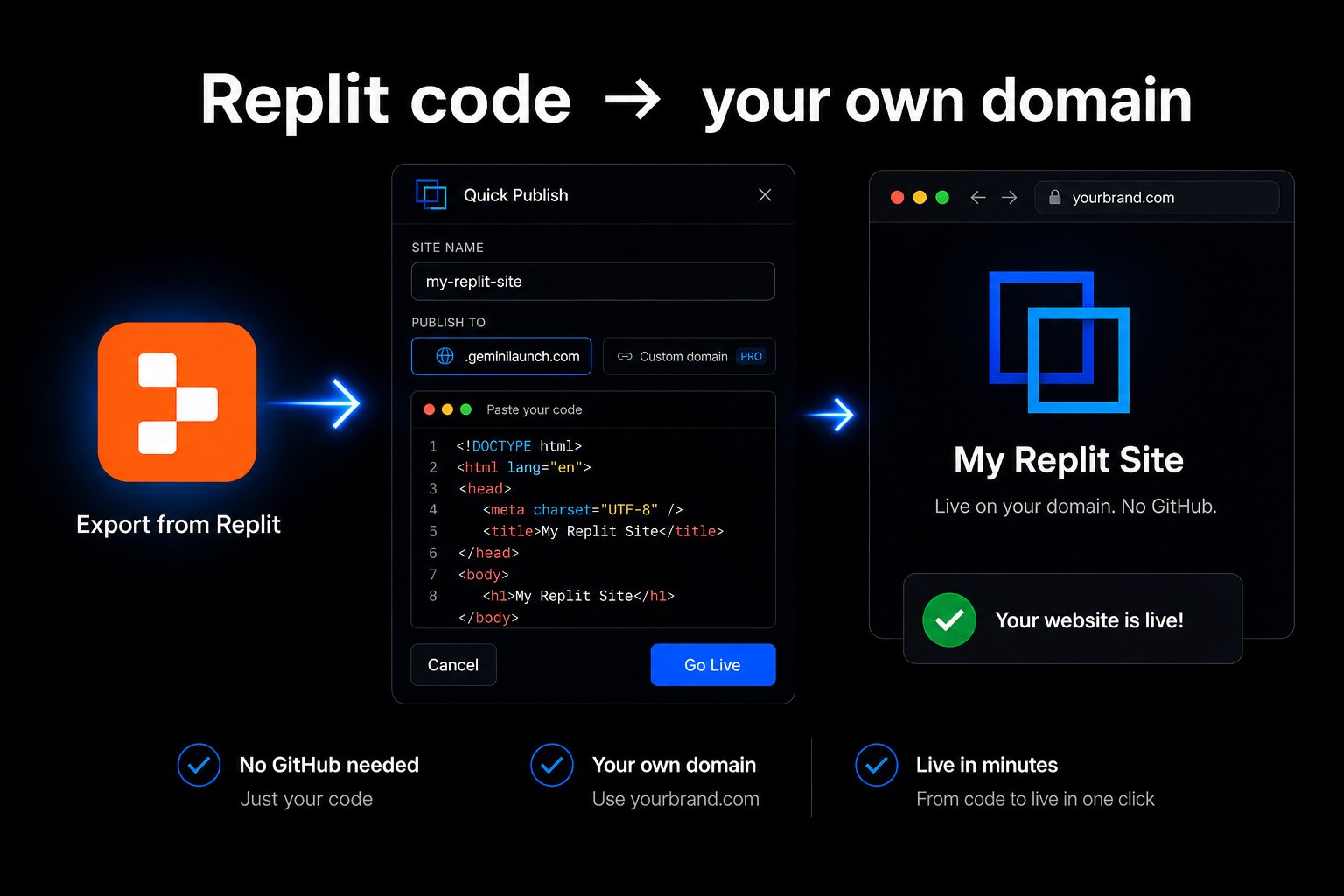
To host a Replit website on your own domain without Replit Publishing: export or copy your static files from Replit, paste them into GeminiLaunch or upload a ZIP/folder with index.html, and click Go Live. You get a public URL in under two minutes. Upgrade to Lite ($5/mo) for 1 domain — or Pro ($15/mo) for up to 5 — and add one DNS record to swap the free subdomain for yourbrand.com. No GitHub required. Related: Cursor custom domain guide, ChatGPT custom domain guide.
The problem
Building in Replit is not the same as owning yourbrand.com
You prototype a landing page in Replit. The preview looks right. Then a client asks for the link — and you realize a dev URL or .replit.app address is not the professional hostname you want on a business card.
Replit's own docs show you can publish and connect a custom domain through Publishing → Domains (A record + permanent replit-verify TXT). Static.app even markets a "build on Replit, host on Static" export path. Both work — but they keep you inside those platforms' deploy and billing flows.
For a static HTML or React page, the shorter path is often: export the files, publish free elsewhere, validate, then point your domain when ready.
Replit's in-editor preview is not a permanent public website
A .replit.app URL is fine for demos — yourbrand.com is for customers
GitHub is optional — export + paste/upload skips the repo entirely
Full-stack repls with APIs need Replit deploy, not a static paste host
Key insight
Replit did the building. Hosting is export, paste or upload, publish, then DNS. You do not need git or a deployment pipeline to get a static page live on your own domain.
Compare
Four ways people host Replit websites
Honest comparison of paths you will see in 2026 — including Replit's built-in Publishing and Static.app's Replit export page.
| Option | Method | Time | GitHub | Custom domain | Best for |
|---|---|---|---|---|---|
| GeminiLaunch | Paste code or upload ZIP/folder | Under 2 minutes | No | Lite $5/mo (1) · Pro $15/mo (5) | Static HTML/React pages with a free start and your own domain |
| Replit Publishing | Publishing → Deploy → Domains tab | 5–15 minutes after setup | No | Via Replit (A + TXT records) | Staying inside Replit for full-stack or always-on Replit apps |
| Static.app (Replit export) | Export project → ZIP → upload | 5–10 minutes | No | Paid plan (~$6/mo+) | Permanent static hosting after leaving Replit deploy |
| GitHub Pages / Vercel | Push repo → connect → build config | 20–40 minutes | Yes | Usually free | Teams that want git history and CI deploys |
Step-by-step
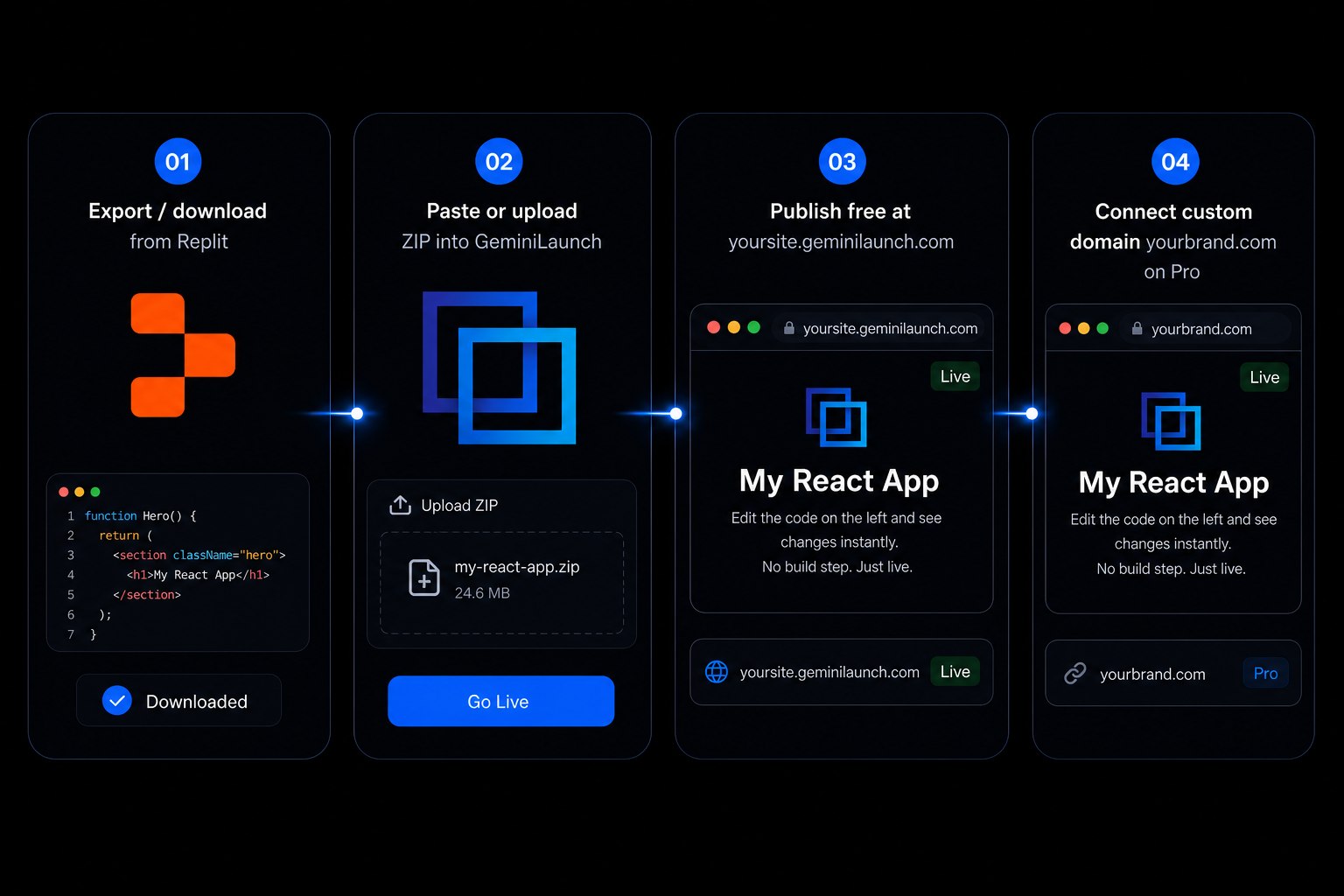
From Replit files to your domain in 4 steps
Most people are live on a free subdomain in under two minutes. Connecting a custom domain adds a few minutes for DNS.
Build your static site in Replit
Use Replit to generate or edit a landing page, portfolio, or small business site. This guide is for static HTML/CSS/JS (or a static build output) — pages with an index.html. Full-stack Replit apps with a live backend should stay on Replit Autoscale or Reserved VM instead.
Tip: For the fastest export, keep a single index.html with inline CSS and JS. Framework projects (Vite, React static export): run the build in Replit's shell, then export the dist/ or public/ folder — not the whole repl with node_modules.
Export the files from Replit
Download your project as a ZIP from Replit's file menu, or open index.html and copy the full code. Make sure index.html is at the top level of what you upload — not buried inside a parent folder. Skip .replit config files and node_modules; you only need the files the browser loads.
Tip: If your repl only has one HTML file, copying and pasting is faster than zipping. Multi-file sites (images, CSS, JS) work best as a ZIP or folder upload.
Paste or upload into GeminiLaunch and go live
Open GeminiLaunch, create a project, and either paste the HTML/React into the editor or upload your ZIP/folder. Click Go Live. You get a public HTTPS URL on a free .geminilaunch.com subdomain — no GitHub, no Replit deployment credits, no A/TXT record setup yet.
Tip: Publish on the free subdomain first. Open the link on your phone and fix layout issues before you point yourbrand.com at it.
Connect your own custom domain
When you want yourbrand.com, upgrade to GeminiLaunch Lite ($5/mo) for 1 domain, or Pro ($15/mo) for up to 5. Add the domain in your dashboard and copy the DNS record GeminiLaunch shows (CNAME or A record) into GoDaddy, Namecheap, Cloudflare, or wherever you bought the domain. Free SSL is included automatically.
Tip: Lite includes 1 custom domain; Pro includes up to 5. DNS usually propagates in 5–30 minutes. Step-by-step DNS walkthrough: launch an AI website on a custom URL.
Avoid these
Common mistakes with Replit websites
Using Replit's preview URL as your permanent site
The in-editor preview and temporary dev URLs are for building — not for clients. You need a stable public HTTPS URL, and ideally your own domain, before you share the project widely.
Assuming GitHub is required to leave Replit
Git is optional. Paste-and-publish or ZIP upload skips the repo entirely. GitHub Pages and Vercel are fine when you want version control — not when you just need a live link today.
Trying to host a full-stack Replit app as a static paste
If your repl needs a Python/Node server, database, or API routes at runtime, GeminiLaunch will not replace that backend. Use Replit Autoscale/Reserved VM, or export only the static frontend.
Uploading node_modules or the entire repl root
Upload the folder that contains index.html or your static build output. Shipping dependencies or config files slows uploads and often breaks the published page.
Be fair
When Replit Publishing or Static.app is the right call
Other paths are better when:
Your repl needs a live backend, database, or API — use Replit Autoscale or Reserved VM
You already pay for Replit deploy and like the Publishing → Domains workflow
You want always-on static hosting on Static.app after exporting a ZIP ($6/mo+)
Your team deploys from GitHub and wants preview branches on every push
If you just want a static Replit page live fast — free first, custom domain when ready — export, paste or upload, and publish is the shortest path.
Related guide
Host a Cursor site on your domain
Same export → publish → DNS flow for Cursor-built static pages.
Read the guideRelated guide
Launch any AI site with a custom URL
DNS walkthrough for Replit, ChatGPT, Claude, Gemini, v0, and bolt.
Read the guideRelated guide
Host a Manus site on your domain
Export a static Manus ZIP, publish free, then connect yourbrand.com.
Read the guideFAQ
Frequently asked questions
Common questions about hosting Replit-generated websites on your own domain.
How do I host a Replit website on a custom domain without Replit Publishing?
Export or copy your static files from Replit, paste them into GeminiLaunch or upload a ZIP/folder with index.html, and click Go Live for a free subdomain. Upgrade to Lite ($5/mo) for 1 domain or Pro ($15/mo) for up to 5, add your domain, and create the DNS record GeminiLaunch shows at your registrar. No GitHub required. Full-stack repls with a live backend should use Replit Publishing instead.
Does Replit host websites with custom domains?
Yes. Replit Publishing can deploy to a .replit.app URL and connect a custom domain with A and replit-verify TXT records at your registrar. That path keeps you inside Replit's deployment billing. GeminiLaunch is an alternative for static HTML/React when you want a free start and custom domains from Lite at $5/mo without staying on Replit deploy.
Do I need GitHub to publish a Replit project?
No. Replit's own Publishing tool does not require GitHub. Neither does paste-and-publish or ZIP upload on GeminiLaunch. GitHub is only needed if you choose a git-based host like GitHub Pages or Vercel with a connected repo.
How is GeminiLaunch different from Static.app for Replit projects?
Static.app markets a dedicated Replit export path: zip your project and upload for static hosting with custom domains on paid plans. GeminiLaunch supports the same ZIP/folder workflow plus paste-from-editor — and offers a free subdomain start with custom domains from Lite at $5/mo (1 domain; Pro $15/mo for up to 5). Pick based on whether you prefer paste, ZIP-only, or staying on Replit deploy.
Can I upload a multi-file Replit project, not just one HTML file?
Yes. GeminiLaunch accepts folder and ZIP uploads with an index.html (Free up to 5 MB per site; Lite up to 15 MB; Pro and Scale up to 45 MB). Single-file paste is still fastest when your repl is one complete page.
Is hosting a Replit website on GeminiLaunch free?
Yes for subdomain hosting. The Free plan includes up to 3 live sites on .geminilaunch.com with free SSL. Custom domains, editing after publish, and no badge start on Lite at $5/month (1 domain); Pro at $15/month includes up to 5 domains.
What about Replit Static Deployments?
Replit Static Deployments serve HTML/CSS/JS from a CDN — good for landing pages and portfolios. They use Replit's Publishing flow and billing. If you already pay for Replit deploy and like the Domains tab there, stay. If you want a simpler paste/upload host with a free tier, GeminiLaunch is the shorter path for many static sites.
Can I use a domain from GoDaddy, Namecheap, or Cloudflare?
Yes. Buy the domain anywhere. In GeminiLaunch Lite or Pro, add the DNS record shown in your dashboard. On Cloudflare, use DNS only (grey cloud) while the domain connects. GeminiLaunch provisions HTTPS automatically.
Will visitors need a Replit account to view my site?
No. Once published on GeminiLaunch, anyone opens your URL in a normal browser. They never see Replit or need a repl login.
Can I update the site after it is on my custom domain?
Yes on any paid plan: export updated files from Replit, paste or re-upload, and republish. Your custom domain stays the same. Free-plan sites stay live as first published and cannot be edited afterward.
Does this work for React sites built in Replit?
Yes for static React output you can paste, or for a production build you upload as a folder/ZIP (e.g. dist/). Server-rendered or API-heavy repls still need Replit deploy or another backend host.
How do I compare free hosts for AI-generated sites?
See our best free hosting for AI websites comparison — GeminiLaunch, Netlify Drop, Cloudflare Pages, GitHub Pages, Vercel Hobby, and Firebase ranked by setup speed and GitHub requirements.
Like this guide? Make GeminiLaunch a preferred source.
Get our hosting and deployment guides surfaced first in your Google results, AI Overviews, and Top Stories.
Put your Replit site on a real URL
Export from Replit, paste or upload to GeminiLaunch, publish free, then connect your own domain when you are ready. No credit card to start.