
Quick answer
To turn a Manus site into a real website without Manus Publish: ask Manus for a static HTML (or built dist) export, download and ZIP with index.html at the root, upload to GeminiLaunch, and click Go Live. Upgrade to Pro ($15/mo) and add one DNS record for yourbrand.com. Manus can also publish in-product — use that when you need full-stack hosting. Related: ZIP/folder upload guide, Replit custom domain guide.
The problem
Manus builds the site — hosting is a separate decision
Manus is an autonomous agent that turns a description into a working website or web app. Its publishing docs cover one-click Publish, custom domains, SSL, and hosting modes. That path is real — and often the right default for full-stack Manus projects.
Many people still want the files somewhere else: a free public URL to share before buying a domain, a static host they already use, or independence from Manus credits and infrastructure. Manus Code Control lets you download the codebase (and optionally sync to GitHub). From there, static HTML or a production build can live on GeminiLaunch.
This guide is for that export path — not a claim that Manus cannot host. If your project needs a live backend, stay on Manus Publish.
Manus Publish is great for full-stack apps and in-product custom domains
Static landing pages and portfolios often only need HTML/CSS/JS files
GitHub sync is optional — ZIP upload skips the repo entirely
A nested ZIP or missing index.html is why exports look blank after upload
Key insight
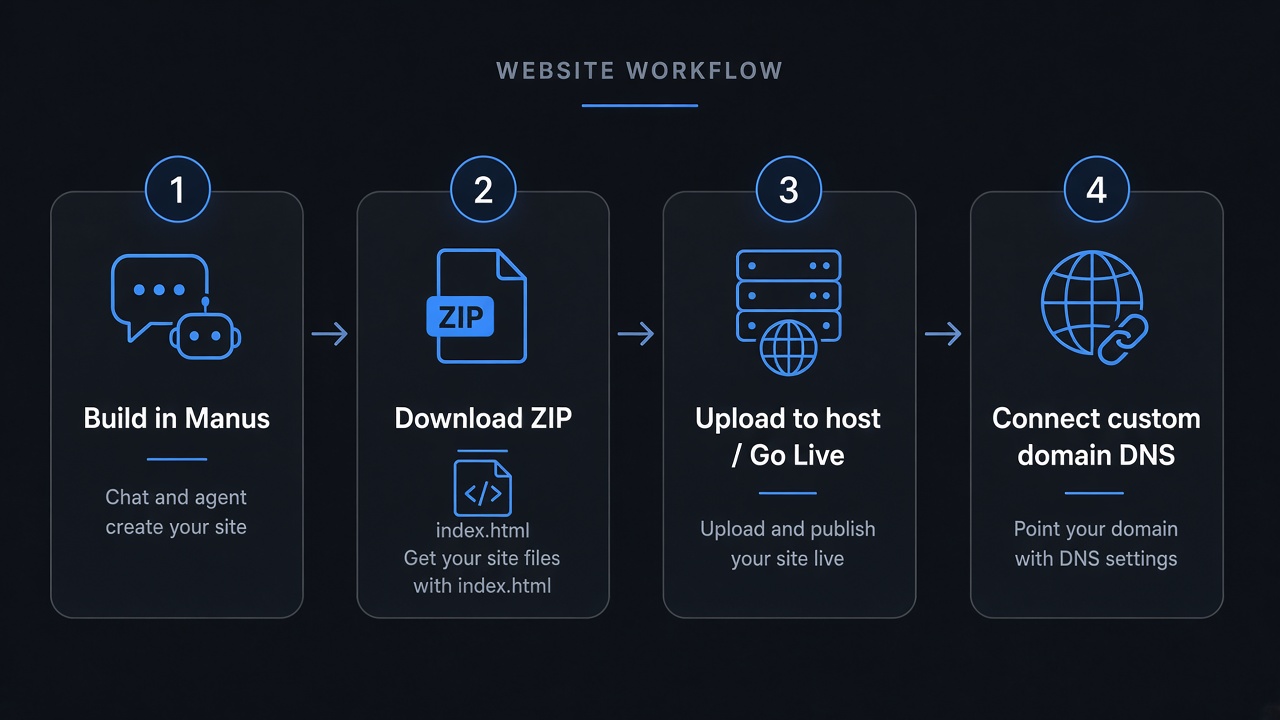
Building and hosting are two steps. Manus did the building. For static exports, hosting is download, ZIP with index.html at the root, upload, publish, then DNS.
Compare
Four ways people host Manus websites
Honest comparison of paths you will see in 2026 — including Manus's built-in Publish and ZIP-first hosts like Static.app.
| Option | Method | Time | GitHub | Custom domain | Best for |
|---|---|---|---|---|---|
| GeminiLaunch | Download ZIP/folder → upload (or paste HTML) | Under 2 minutes | No | Pro ($15/mo, up to 5) | Static Manus exports with a free start and your own domain |
| Manus Publish | Publish in Manus → optional custom domain in-product | Minutes after the site is ready | No | Via Manus (DNS they provide) | Full-stack Manus apps and staying inside Manus hosting |
| Static.app / Drop hosts | Export → ZIP → drag-and-drop upload | 5–10 minutes | No | Paid plans (often ~$5–6/mo+) | ZIP-first hosts when you already have files on disk |
| GitHub → Vercel / Pages | Manus GitHub sync → connect repo → build | 20–40 minutes | Yes | Usually free on the host | Teams that want git history and CI deploys |
Step-by-step
From Manus files to your domain in 4 steps
Most static exports are live on a free subdomain in under two minutes. Connecting a custom domain adds a few minutes for DNS.
Build a static site in Manus (prompt for HTML)
Describe the landing page, portfolio, or multi-page brochure site you want in Manus. For the smoothest export to a static host, ask for plain HTML, CSS, and JavaScript — not a full-stack app with a database or server. Manus can also generate React/Vue projects; those need a production build before upload.
Tip: Copy-paste prompt: "Create a complete multi-page website using only plain HTML, CSS, and JavaScript — no frameworks, no backend, no database. Put index.html at the project root and use relative paths for assets."
Download the project and ZIP it correctly
Use Manus Code Control to download the full codebase (or copy a single HTML file if that is all you built). Compress the site so index.html sits at the top of the ZIP — not inside a nested parent folder. Skip node_modules and server-only folders; you only need what the browser loads.
Tip: Open the ZIP once before uploading. If you see ProjectName/index.html instead of index.html at the root, re-zip the inner folder. Nested ZIPs are a common cause of blank pages.
Upload to GeminiLaunch and go live
Open GeminiLaunch, create a project, and upload the ZIP or folder (or paste a single-file HTML page). Click Go Live. You get a public HTTPS URL on a free .geminilaunch.com subdomain — no GitHub, no Manus hosting credits for that URL, no DNS yet.
Tip: Free plan: up to 3 live sites, ZIP/folder up to 5 MB. Pro raises uploads to 45 MB and unlocks editing after publish. Preview on your phone before you point a custom domain at it.
Connect your own custom domain
When you want yourbrand.com, upgrade to GeminiLaunch Pro ($15/mo). Add the domain in the dashboard and create the DNS record GeminiLaunch shows (CNAME or A) at GoDaddy, Namecheap, Cloudflare, or wherever you bought the domain. Free SSL is included automatically.
Tip: Pro includes up to 5 custom domains. DNS usually settles in 5–30 minutes. Full DNS walkthrough: how to launch an AI website on a custom URL.
Avoid these
Common mistakes with Manus website hosting
Saying Manus cannot host (it can)
Manus has one-click Publish, custom domains, and hosting modes in its own docs. Exporting is for ownership, static-only hosting, or leaving Manus infrastructure — not because Manus has no publish button.
Uploading a full-stack Manus app as static files
If the project needs a live backend, platform database, or auth at runtime, a static host will not replace that. Stay on Manus Publish (or a full-stack host). Export only the static frontend when that is enough.
Uploading framework source instead of the build
React/Vue/Vite projects need npm install and npm run build (or Manus's production build). Upload dist/ or build/ with index.html — not the raw src tree. See our Vite dist without GitHub guide if you hit a blank page.
Assuming GitHub is required to leave Manus
Manus offers GitHub sync for two-way export, but ZIP/folder upload skips the repo entirely. Use Git when you want version control — not when you only need a live link today.
Blank after upload? See why your uploaded website is blank and the Vite/React dist upload guide.
Be fair
When Manus Publish (or GitHub deploy) is the right call
Other paths are better when:
Your Manus app needs a live backend, database, auth, or WebSockets — use Manus Publish (Autoscale or Reserved)
You want to buy and attach a domain entirely inside Manus
Your team already exports to GitHub and deploys with Vercel, Cloudflare, or similar CI
You need Static.app-style forms, desktop folder sync, or their MCP extras on a paid plan
If you just want a static Manus page live fast — free first, custom domain when ready — download, ZIP, upload, and publish is the shortest path that skips GitHub.
Related guide
Host a website from a ZIP or folder
Limits, index.html rules, and Drop-host comparisons.
Read the guideRelated guide
Host a Replit site on your domain
Same export → publish → DNS flow for browser-built sites.
Read the guideRelated guide
Launch any AI site with a custom URL
DNS walkthrough for ChatGPT, Claude, Gemini, v0, and more.
Read the guideFAQ
Frequently asked questions
Common questions about hosting Manus-generated websites on your own domain.
How do I turn a Manus site into a real website without Manus Publish?
Build a static site in Manus, download the files, ZIP them with index.html at the root, upload to GeminiLaunch, and click Go Live for a free subdomain. Upgrade to Pro ($15/mo), add your domain, and create the DNS record GeminiLaunch shows at your registrar. No GitHub required. Full-stack Manus apps should stay on Manus Publish.
Does Manus host websites itself?
Yes. Manus Publishing can deploy your app, connect a custom domain with DNS records they provide, and manage SSL. Autoscale and Reserved hosting modes are documented in Manus's own publishing guide. GeminiLaunch is an alternative when you want to host a static export independently.
When should I leave Manus hosting and export?
Export when you want a static site on a host you control, a free subdomain start before buying a domain, simpler ZIP publishing without Manus hosting credits, or a clean separation between “built in Manus” and “hosted elsewhere.” Keep Manus Publish for full-stack apps and in-product domain workflows.
Do I need GitHub to publish a Manus project?
No. Manus can sync to a private GitHub repo if you want, but ZIP download plus upload (or single-file paste) on GeminiLaunch needs no repository. GitHub Pages and Vercel are optional paths for teams that already use git.
Can Manus output plain HTML I can upload?
Often yes — especially if you ask for plain HTML, CSS, and JavaScript with no frameworks. If Manus generates React or Vue, run a production build first, then upload the dist or build folder. Multi-page HTML sites upload as a ZIP with index.html at the root.
Is hosting a Manus website on GeminiLaunch free?
Yes for subdomain hosting. The Free plan includes up to 3 live sites on .geminilaunch.com with free SSL and ZIP/folder uploads up to 5 MB. Custom domains, editing after publish, and no badge are on Pro at $15/month (up to 5 domains).
Will visitors need a Manus account to view my site?
No. Once published on GeminiLaunch, anyone opens your URL in a normal browser. They never need Manus access. The same is true of a site published through Manus's own public URL — export is about where the files live, not viewer logins.
How is this different from Static.app Manus hosting?
Static.app markets a Manus ZIP upload path with forms and desktop sync on paid plans. GeminiLaunch supports the same ZIP/folder workflow for static Manus exports, plus a free subdomain start and custom domains on Pro ($15/mo, up to 5). Pick based on price, extras (forms vs paste/React paths), and whether you also publish from chat tools.
Can I update the site after it is on my custom domain?
Yes on Pro and Scale: download an updated export from Manus, re-upload or paste, and republish. Your custom domain stays the same. Free-plan sites stay live as first published and cannot be edited afterward.
What about Manus full-stack apps with databases?
Platform databases and server features usually do not move with a static ZIP. Self-hosting those stacks needs a real backend host. For brochure sites and portfolios, ask Manus for a static HTML export instead.
Like this guide? Make GeminiLaunch a preferred source.
Get our hosting and deployment guides surfaced first in your Google results, AI Overviews, and Top Stories.
Put your Manus site on a real URL
Download a static export from Manus, upload to GeminiLaunch, publish free, then connect your own domain when you are ready. No credit card to start.