Quick answer
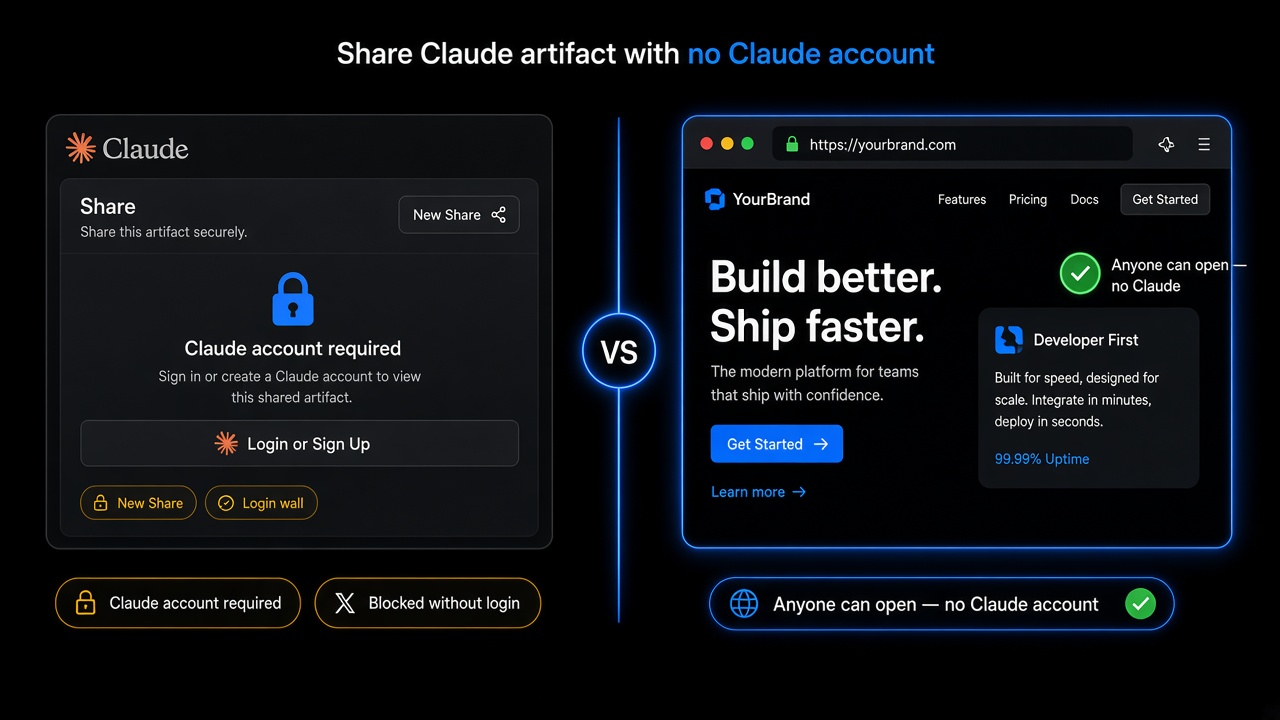
New Claude Share links generally require a Claude account to open. That does not block a website for clients. Copy the artifact HTML, paste it into GeminiLaunch, and get a free public HTTPS link anyone can open — no Claude signup. Add yourbrand.com from Lite ($5/mo) when you are ready. Official Share rules: Claude Help: publish and share artifacts.
Login wall? Go live free.
Paste from the artifact. Share a link anyone can open — no Claude account.
Scope
Who this page is for (and who should leave)
Use this guide when the problem is “viewers need a Claude account to open my share” — not when you already need DNS, brand SEO, or the full Claude → website playbook.
- You shared a Claude artifact and clients hit a Claude sign-in wall
- Anthropic’s docs say new shared artifacts generally need a Claude account to open
- You need a public HTTPS link anyone can open in any browser — no Claude signup
- Claude already built the page in an artifact — you just need a shareable URL for investors or clients
Leave this page if:
You want a Claude artifact on yourbrand.com
Full Claude → website path, Share vs legacy Publish, custom domain from Lite
You only need any free host for Claude HTML
General free hosting walkthrough — not the Share login-wall deep dive
Your preview only works inside the chat UI
Beginner guide: chat preview ≠ platform share ≠ real host (all AIs)
Why it happens
Three reasons Claude Share blocks non-Claude viewers
Founders often think the artifact “broke.” Usually Share is working as designed — Anthropic gates new shared artifacts behind Claude accounts. Confirm against their docs, then publish the code you already have.
New Share links ask for Claude
Anthropic’s help docs say everyone generally needs a Claude account to open new shared artifacts — even with the link. Fine for teammates on Claude; painful for clients and investors who are not.
Legacy Publish is the exception, not the rule
Artifacts made in chat before September 16, 2026 can still use Publish on Free/Pro/Max, and a legacy published link can open without a Claude account. New work uses Share — plan for the login wall.
Claude’s URL is still not your brand
Even when a legacy link opens without login, you stay on Claude’s domain with platform framing. You never get yourbrand.com from Share or Publish alone.
Key insight
Claude can still build the page. Share is only one way to distribute it. A login wall does not mean you lack a website — it means you need a normal host URL.
Decision
Claude Share vs publish a no-login live link
Keep Share for Claude teammates. For anyone outside Claude — clients, investors, hiring managers — publish the artifact code on a host you control.
| Path | Cost | What you get | Best for |
|---|---|---|---|
| Claude Share (new) | Included with Claude chat | Link on Claude’s domain; viewers generally need a Claude account | Teammates who already use Claude |
| Legacy Publish (if still available) | Included for eligible older artifacts | May open without Claude login — still Claude’s URL, no yourbrand.com | Old artifacts only; not a plan for new client work |
| Publish on GeminiLaunchWins here | Free live URL; Lite $5/mo for 1 custom domain | Public HTTPS anyone can open — no Claude account for visitors | Clients, investors, and anyone outside Claude |
Already past the login wall and ready for yourbrand.com? Use Turn a Claude artifact into a website instead of this no-account share guide.
How to
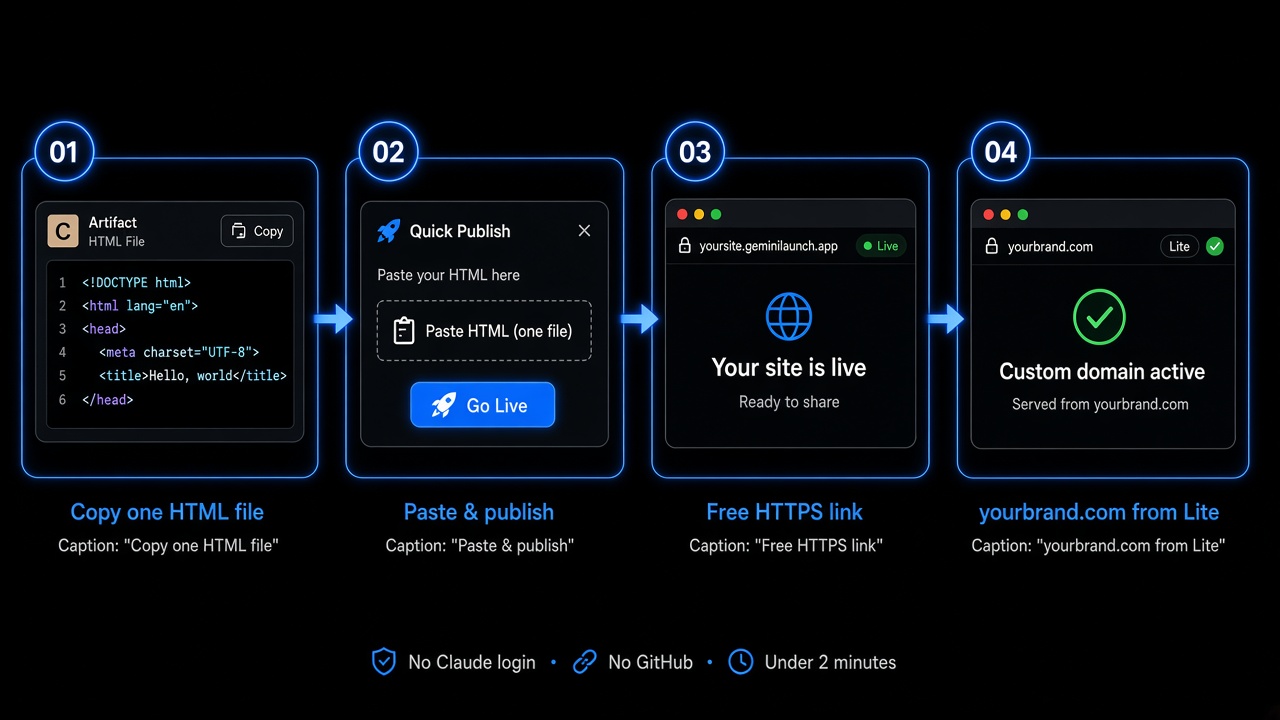
Share a Claude artifact with no Claude account (4 steps)
Same paste path founders use when Share fails for non-Claude viewers. No GitHub, no terminal, no Anthropic signup for your audience.
Open the artifact and copy the full code
In Claude, open the artifact panel. Prefer one complete HTML file with CSS in a style tag and JavaScript in a script tag. Use Copy on the code block — confirm it ends with </html>.
If Claude split the page into files, ask: "Combine into one self-contained index.html ready to paste into a host."
Paste into GeminiLaunch and publish
Open GeminiLaunch, paste the HTML (or upload a ZIP/folder with index.html at the root), and click Go Live. No GitHub, no terminal, no Claude Pro required for this step.
Optional: paste into /tools/html-preview first to catch mobile layout bugs privately — free, no signup.
Share the free HTTPS link (no Claude login)
You get a public URL on a free GeminiLaunch subdomain. Anyone opens it in Chrome, Safari, or phone browsers — no Claude account, no Anthropic sign-in prompt, no artifact wrapper.
Free: up to 3 live sites, 5 MB each. Enough for most founder landing pages and client previews.
Add yourbrand.com from Lite when ready
Send the free link today. When you want a business card URL, upgrade to Lite ($5/mo) for 1 custom domain (or Pro for up to 5), add the DNS record GeminiLaunch shows, and keep the same site — no rebuild.
Full Claude → custom domain walkthrough lives on the sibling guide — this page owns the no-account share wedge.
Want a browser check before Go Live? Preview AI HTML online — or open the free HTML preview tool.
Avoid these
Common mistakes with Claude Share
Sending the Claude Share link to non-Claude users
Your client should not need an AI subscription to open a landing page. If they hit a login wall, export the code and publish a normal HTTPS URL instead.
Assuming legacy Publish will cover new artifacts
Share replaced Publish for new work. Legacy Publish without a login is a narrow exception for older chats — not a product strategy.
Emailing screenshots or a Drive ZIP instead of a URL
Clients cannot click a screenshot. A public HTTPS link is the shareable object — same lesson as our beginner live-link guide, scoped here to Claude’s login wall.
Copying only part of a multi-file artifact
Missing CSS or JS makes the live page look empty. Ask Claude for one self-contained file, or ZIP a folder with index.html at the root.
Still stuck on “the preview only works in chat”? Start with AI website only works in chat? Get a live link.
Related guide
Claude artifact → website
Full Share vs host path plus yourbrand.com from Lite.
Read the guideRelated guide
Host Claude HTML free
Broader free-host walkthrough when login wall is not the question.
Read the guideFAQ
Share Claude artifact without account FAQ
Direct answers for Claude Share login walls, legacy Publish, and client-ready links — tuned for Google, ChatGPT, Claude, and Perplexity.
Do people need a Claude account to view a shared artifact?
For new shared artifacts, Anthropic’s help docs say everyone generally needs a Claude account — even with the link. Legacy published chat artifacts (made before September 16, 2026) are the main exception. On GeminiLaunch, anyone can view your site in any browser with no Claude account.
How do I share a Claude artifact without a Claude account?
Copy the artifact HTML (or ZIP), paste or upload into GeminiLaunch, and click Go Live. Share that free public HTTPS URL. Visitors never sign into Claude.
What changed with Claude Share vs the old Publish button?
Newer artifacts use Share instead of Publish. Anthropic treats artifacts made in chat before September 16, 2026 as legacy — those can still use Publish on Free/Pro/Max, and a published legacy link can open without a Claude account. New Share links generally require viewers to sign in and stay on Claude’s URL.
Can clients open my Claude artifact without signing up?
Not reliably on new Share links. Publish the same code on GeminiLaunch (or another host you control) so clients open a normal website URL with no Claude signup.
Is Claude Share enough for a client landing page?
Usually no. New Share links often need a Claude account, stay on Claude’s domain, and never give yourbrand.com. Use Share for internal Claude users; use a real host for external audiences.
How do I get yourbrand.com for a Claude artifact?
Publish on GeminiLaunch first, then connect yourbrand.com from Lite ($5/mo). Step-by-step Claude → custom domain: Turn a Claude artifact into a website.
Does this work on Claude Free?
Yes for building and exporting the page. The login-wall problem is about viewers of Share links, not whether you paid for Claude. Free GeminiLaunch hosting works the same either way.
Can I skip paste and publish from Claude with MCP?
Yes if you connect GeminiLaunch MCP in Claude. Setup guide: publish a website from Claude or ChatGPT with MCP. This article stays on the paste path most founders use when a Share link fails for clients.
Like this guide? Make GeminiLaunch a preferred source.
Get our hosting and deployment guides surfaced first in your Google results, AI Overviews, and Top Stories.
Claude Share needs a login? Your artifact can still go live
Skip sending clients into a Claude signup. Paste the artifact into GeminiLaunch, get a free live link anyone can open, and connect yourbrand.com from Lite when you are ready. No credit card to start.